
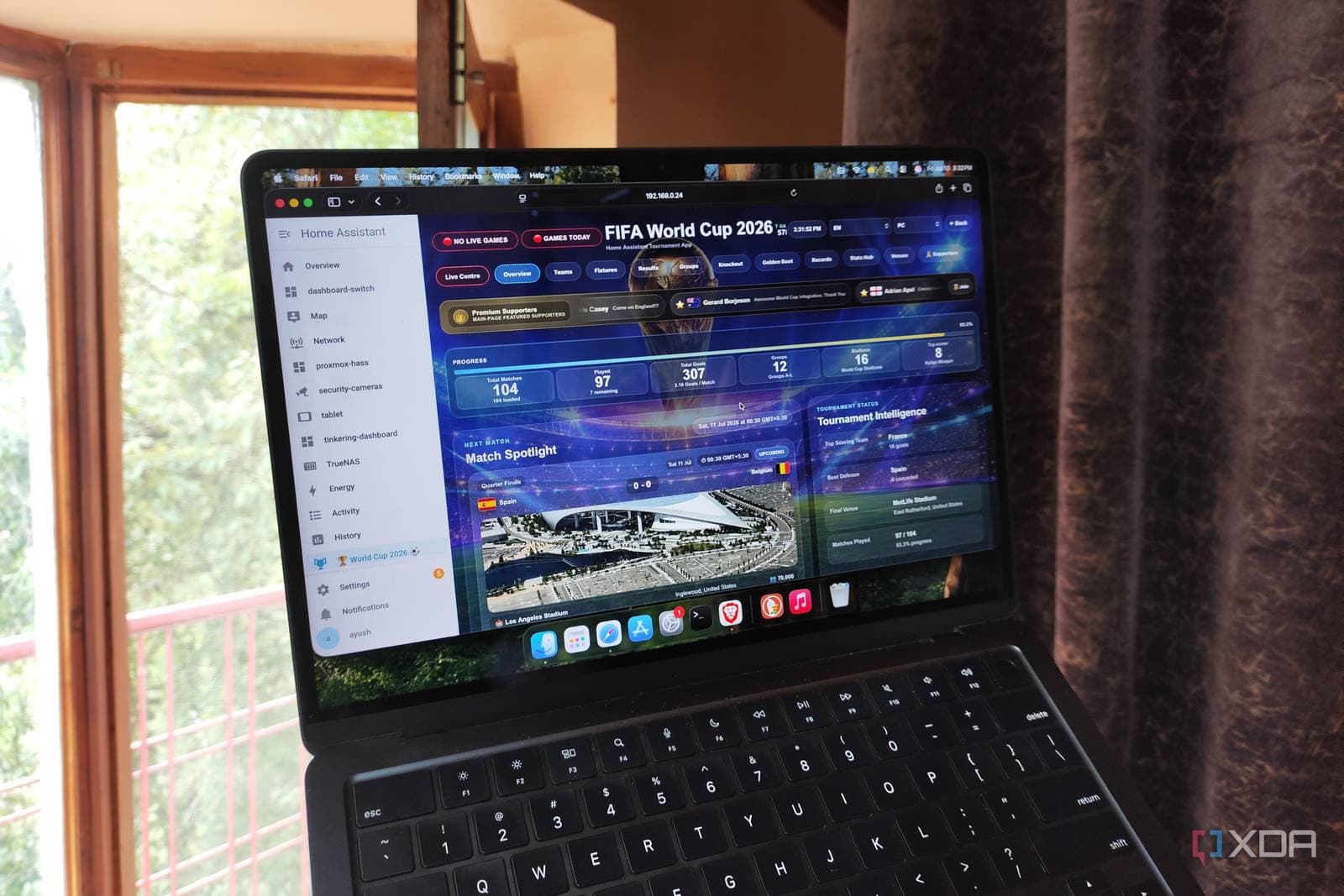
A home automation enthusiast created a fully automated World Cup viewing setup using Home Assistant (free, open-source smart home software). This system sends match alerts, controls the TV, and tracks every game. Best of all, the instructions are simple enough for anyone to follow.
What Was Built
The setup, shared by XDA Developers, utilizes Home Assistant to pull live World Cup match data and display it on a home dashboard. Imagine a sports ticker integrated into your entire home. When a match is about to start, the system can automatically turn on the TV, dim the lights, and send a phone notification — all without needing a remote or checking a schedule.
At the heart of this system is a custom dashboard card that shows live scores, upcoming kickoff times, and team information. The data streams in through an integration (a plugin that connects Home Assistant to external services), refreshing in real time so scores update as goals happen.
The Automation Chain
Here’s how it works: Home Assistant checks if a match is starting within a set window, like 15 minutes. If it is, the system activates a sequence of actions. Lights change to a warmer color, the TV switches to the right channel or streaming app, and a notification pops up on your phone. It’s similar to a calendar reminder, but instead of just buzzing your phone, it prepares your entire living room.
Users can also set up goal alerts. When scores update in the data feed, Home Assistant detects the change and can trigger a flash of the smart lights or send another phone ping. It’s like having a friend text you every time something happens, except this friend never misses a goal and doesn’t take bathroom breaks at the worst moments.
Why This Matters Beyond One Fan’s Setup
Home Assistant boasts nearly 900,000 active installations worldwide, according to the project’s analytics. The World Cup runs through the summer of 2026, with matches taking place across the United States, Canada, and Mexico. That means kickoff times can vary greatly depending on where you’re watching from. For fans on the East Coast catching a late European broadcast or West Coast viewers trying to catch a 9 a.m. opener, automation like this helps solve a real problem. Dealing with time zones can be tricky, and missing the first ten minutes of a match because you forgot to check the schedule is frustrating.
This setup doesn’t require expensive hardware, either. If you already have a smart TV, a phone, and any smart bulbs or plugs, you’re set. Home Assistant itself runs on a Raspberry Pi (a credit-card-sized mini computer that costs around $35) or on an old laptop sitting in a closet.
| Detail | Info |
|---|---|
| Host Countries | USA, Canada, Mexico |
| Total Matches | 104 |
| Teams Competing | 48 |
| Home Assistant Active Installs | ~900,000 |
| Cost to Run Home Assistant | From ~$35 (Raspberry Pi) |
What This Means for You
You don’t have to be a software engineer to pull this off. The Home Assistant community offers pre-built templates for World Cup dashboards that you can import in just a few clicks. If you already use Home Assistant for things like smart thermostats or door sensors, adding match tracking is a small step. If you’ve never used it before, this might be a great reason to start. The World Cup lasts until mid-July, but the automation skills you gain will help you track or schedule anything else.
For those who aren’t ready to set up a home server, you can still benefit from this concept. Most modern smart TVs have calendar apps or sports notification features built in. Services like Google Home and Amazon Alexa provide basic sports score routines. They’re less customizable, but you can still ask Alexa to remind you when a match starts.
The Bigger World Cup Moment
The tournament impacts more than just living room setups. Feeld, a dating and connection app, reported a spike in what it calls “meaningful connections” in World Cup host cities. This suggests the event is bringing people together offline just as much as online. Whether that’s a reason to automate your viewing setup even more — or to put the phone down entirely — is up to you.
Community Reactions
“I’ve been running something similar since the Euros. The goal light flash is genuinely the best thing I’ve ever added to my house. My neighbors think I’m insane.”
— u/smarthome_pete, Reddit r/homeassistant
“This is the kind of content that makes me actually want to learn Home Assistant. I’ve been putting it off for two years, but World Cup automation might finally get me to set it up.”
— YouTube comment on XDA Developers’ Home Assistant coverage
What To Watch
- World Cup group stage runs through mid-July 2026 — expect the highest volume of matches and complex scheduling across three host countries.
- Home Assistant’s next major release (version updates drop roughly every month) may include improved sports integrations based on community demand during the tournament.
- Smart TV manufacturers like Samsung and LG are expanding their sports notification features — look for World Cup-specific updates to their native apps as the knockout rounds approach.
- If the Feeld data holds, expect more platform-level sports tie-ins from social and dating apps as the tournament reaches its final weeks.
Sources: XDA Developers, Mashable

Ava Mitchell
Ava Mitchell is a digital culture journalist at Explosion.com covering social media platforms, streaming services, and the creator economy. With 4 years reporting on TikTok, Instagram, YouTube, and the apps that shape daily life, Ava specializes in explaining platform policy changes and their impact on everyday users. She previously managed social media strategy for a tech startup, giving her firsthand experience with the platforms she now covers.


