
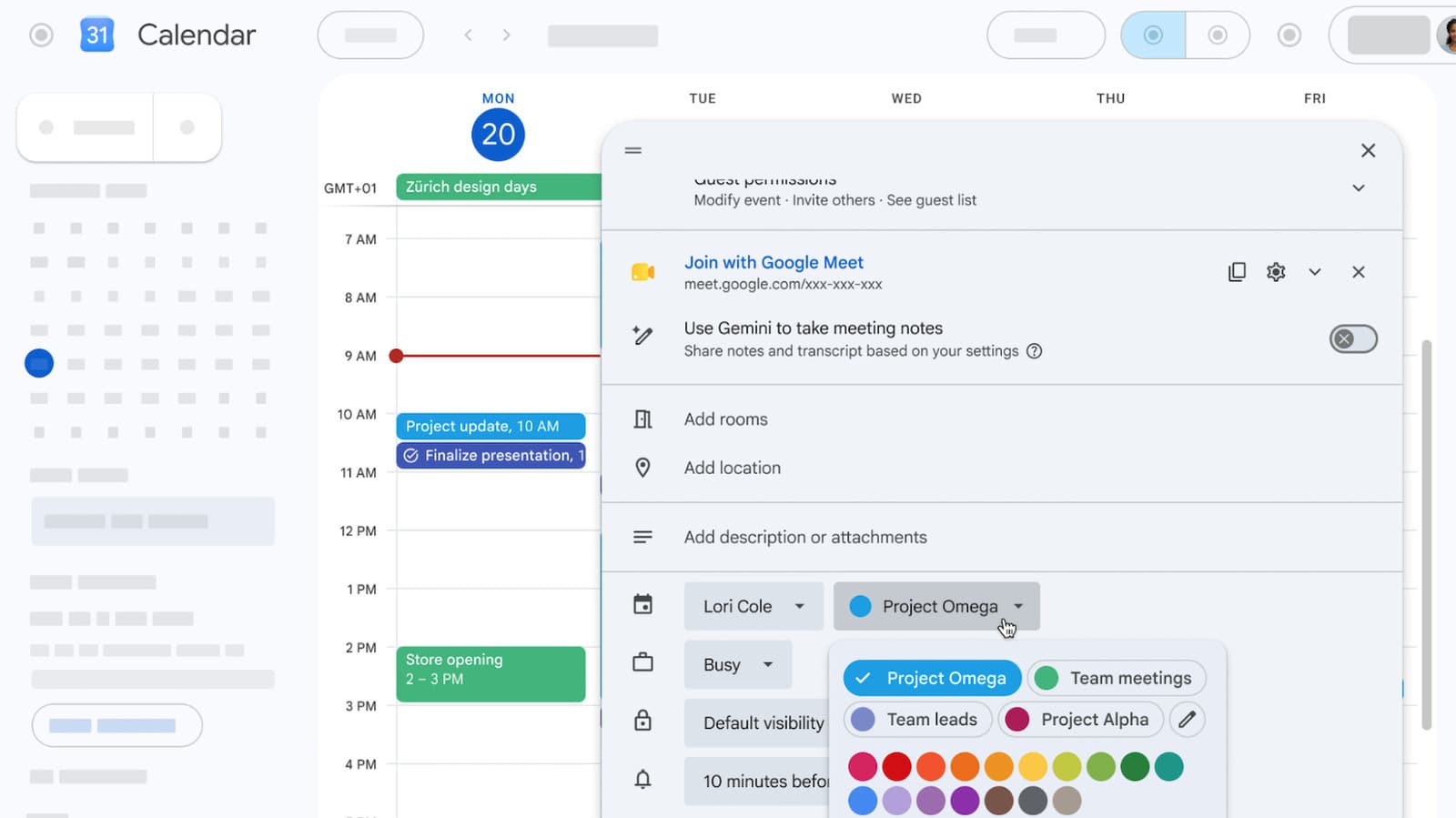
Google Calendar has increased its color options from 11 predefined choices to as many as 200 custom colors for events. This change gives users a lot more control over organizing their schedules.
What Changed
For a long time, users had to work with just 11 colors to label their events. That limitation is now a thing of the past. Google has launched expanded color customization across the Calendar web app, its iOS and Android apps, and the Calendar API, which allows third-party apps to connect to your calendar.
It’s like moving from a basic box of 8 Crayola crayons to a full artist’s set. If you’ve ever found yourself running out of distinct colors for work meetings, school pickups, gym sessions, and social plans, this update is a game changer.
How It Works
You can access the expanded palette while creating or editing an individual event. Instead of a limited list of preset colors, you now have a much wider selection of custom shades. This change affects individual events only, so you can keep your color-coding system as detailed or as simple as you prefer.
The update is rolling out across all platforms at the same time. If you’re using the web version, you won’t have to wait for a separate mobile app update.
| Detail | Data |
|---|---|
| Previous color limit | 11 predefined colors |
| New color limit | Up to 200 custom colors |
| Platforms updated | Web, iOS, Android, Calendar API |
| Company | Alphabet / Google (GOOGL) |
| GOOGL stock price | $343.71 (-0.45%) |
| Google founded | 1998, Mountain View, CA |
Why Google Is Doing This Now
Google Calendar hasn’t had a major usability update in some time, and the 11-color limit frustrated many power users. This was especially true for those managing multiple projects, family schedules, or juggling several Google Workspace accounts. The Calendar API update is particularly important for businesses. Developers creating scheduling tools for Google Calendar can now pass custom color data through their apps, which could enhance visual organization features in third-party tools.
What This Means
This change is a small but practical improvement for most users. If you’ve ever used Google Calendar for multiple recurring commitments, you’ve likely faced the issue of every color being taken. Assigning a different shade of blue for your 9 a.m. standup versus your 2 p.m. client call might seem minor, but visual differentiation helps you scan a busy week quickly.
For Google Workspace users in larger organizations, the API update could be more impactful. Scheduling tools, project management apps, and HR platforms that sync with Google Calendar can now display richer color schemes. This makes calendar data easier to read without needing to open the app.
Community Reaction
“Finally. I have like 15 different recurring events, and I’ve been reusing the same 3 colors for years because everything else clashed.” — Reddit user, r/google
“Honestly thought this was already a feature. Hard to believe it took this long.” — YouTube comment, The Verge coverage
Learn More
- Google Calendar finally has more color options for events — The Verge
- Google Calendar lets you use any color you want for your events — Engadget
What To Watch
- Third-party app updates: With the Calendar API now supporting more colors, expect updates from scheduling and productivity apps like Fantastical, Calendly, and project management tools in the coming weeks.
- Calendar-wide color options: This update currently applies to individual events. It’ll be interesting to see if Google extends the expanded palette to entire calendars as well.
- Google I/O follow-ups: Google has been gradually updating its Workspace apps throughout 2026. More usability improvements for Calendar could be on the way as part of this broader initiative.

Maya Torres
Maya Torres is the Consumer Tech Editor at Explosion.com with 7 years covering product launches for major technology publications. She has reviewed over 300 devices across smartphones, laptops, wearables, and smart home products. Maya specializes in translating spec sheets into real-world buying advice and attends CES, MWC, and Apple keynotes as press. Her reviews focus on helping readers decide what to buy, not just what specs look good on paper.


