Google Drive’s free storage limit of 15GB has stayed the same for years, but the push to upgrade to a paid plan is stronger than ever. A recent policy change is making things tougher for new users. Here’s what’s happening and what you can do about it right now.
What Changed (And Why You Should Care)
For a long time, Google has provided 15GB of free storage shared across Drive, Gmail, and Google Photos. This limit hasn’t budged since 2013. However, as reported by XDA Developers, new Google accounts now have an extra hurdle: you might have to provide a phone number to access a usable portion of that free storage. This could be a significant concern for those who value their privacy or prefer not to link their phone number to a Google account.
Additionally, that 15GB can fill up quicker than you might think. Gmail can consume several gigabytes over the years, especially if you have a lot of attachments. Google Photos also changed its policy in June 2021, ending unlimited free storage in “high quality” mode. Now, every photo and video you upload counts against your 15GB limit.
| By The Numbers: Google / Alphabet | |
|---|---|
| Free Storage Offered | 15GB (shared across Drive, Gmail, Photos) |
| Free Storage Cap Unchanged Since | 2013 |
| Google One Entry-Level Paid Plan | 100GB for $2.99/month |
| Unlimited Photos Ended | June 2021 |
| Stock (GOOGL) | $368.53 (-0.98%) |
| CEO | Sundar Pichai |
| Headquarters | Mountain View, CA |
Free Ways to Reclaim Your Google Storage
Before you consider paying for extra space, try these steps. Most users can clear out several gigabytes in under 30 minutes.
1. Use Google’s Built-In Storage Manager
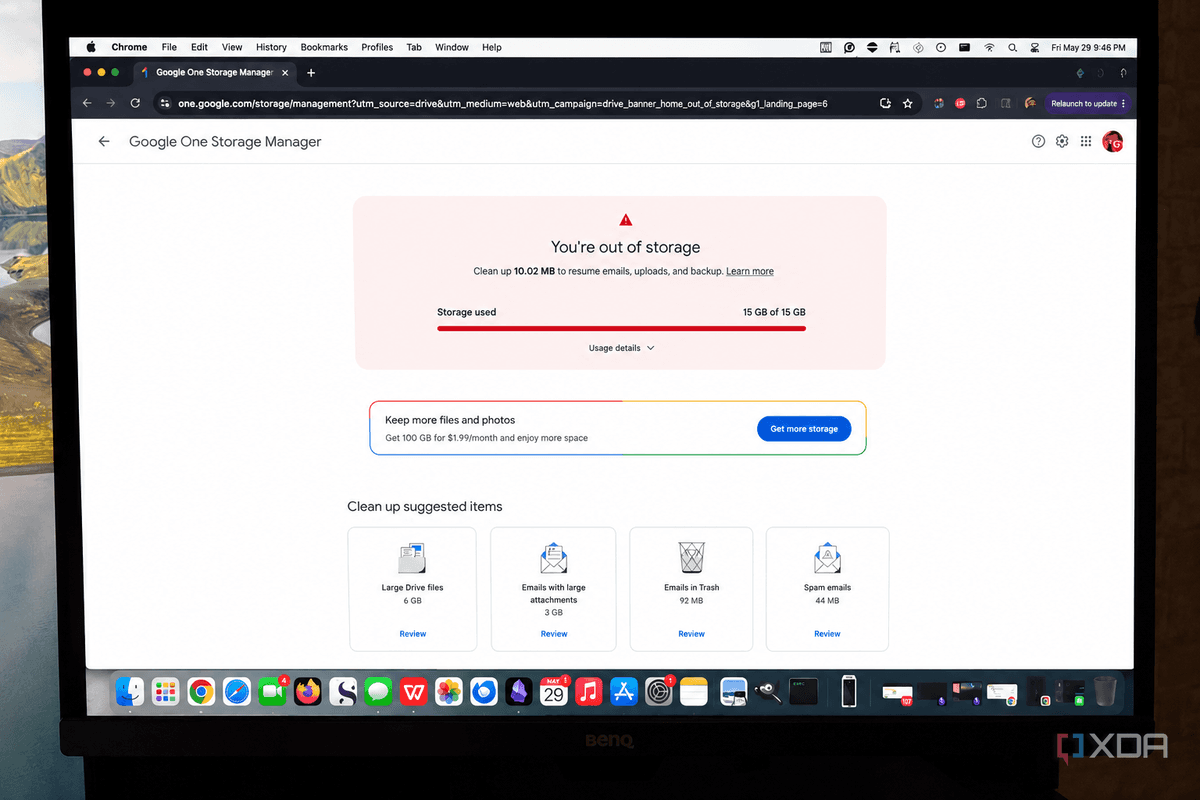
Head over to one.google.com/storage and sign in. The storage manager shows what’s taking up your space and allows you to delete large or unnecessary files with just a few clicks. This is the quickest way to start.
2. Clear Out Old Gmail Attachments
In Gmail’s search bar, type has:attachment larger:10MB and hit enter. This will bring up every email with attachments over 10MB. You might be surprised at how many old emails contain large files you’ll never use again. Delete them, and remember to empty the Trash folder; Gmail holds deleted emails for 30 days before they’re removed from your storage count.
3. Compress Your Google Photos
Google Photos lets you convert your existing original-quality photos to “Storage Saver” quality. These are compressed versions that Google claims look the same. Open Google Photos, go to Settings, and find the option to free up space this way. Most users won’t notice a difference in quality on a phone screen.
4. Delete Duplicate and Blurry Photos
Google Photos includes a tool under Library > Utilities that automatically finds blurry images, duplicates, and unnecessary screenshots. Getting rid of these can free up more space than you’d think, especially if you take a lot of pictures.
5. Check Google Drive for Old Junk
Open Google Drive and sort files by size (click the storage bar on the left sidebar). Large video files, old backups, and forgotten project folders can pile up. Also, check your Trash folder in Drive—files there still count against your storage limit until you permanently delete them.
6. Remove Unused Android App Backups
If you’ve had Android phones over the years, Google might be storing backups of old apps and devices in your Drive. Go to drive.google.com/drive/backups to check what’s there and delete anything you don’t need anymore.
What This Means for Everyday Users
For many, Google Drive storage fills up slowly and then suddenly. Once you hit the limit, you can’t receive new emails with attachments, your phone stops backing up photos, and files won’t sync. You’ll probably notice this at the worst possible time, like when you’re trying to send an important document or back up photos from a trip.
The new phone-number requirement for new accounts, as XDA Developers reported, adds another obstacle for those creating new Google accounts who prefer to keep their personal number private. Although it seems minor, it indicates that Google is tightening the free tier rather than loosening it over time.
The best advice is to revisit the cleanup steps above every six months or so. According to CNET, many users can recover several gigabytes with a focused cleanup session, giving you months or even years before you need to think about paying for more storage.
Community Reactions
“Every year I have to do this cleanup ritual. Google has basically been forcing people toward Google One for years by keeping the free limit at 15GB while everything gets bigger. At this point it’s working, I finally caved and paid.”
“The Storage Manager tool is genuinely useful; it found about 4GB of stuff in my Gmail I completely forgot about. I should have done this a long time ago.”
What To Watch
- Google I/O announcements: Google hasn’t hinted at any plans to increase the free storage limit, but updates to storage policy often follow major product announcements. Keep an eye out for any changes to Google One pricing or free tier terms.
- Phone number requirement expansion: Monitor whether the new phone-number requirement for full storage access extends to existing accounts or stays limited to new sign-ups.
- AI storage pressure: As Google adds more AI features to Drive and Photos (including its Gemini AI assistant), the demand for storage might rise, pushing free-tier users toward the limits faster than before.

Daniel Park
Daniel Park covers AI, cloud infrastructure, and enterprise software for Explosion.com. A former software engineer who transitioned to technology journalism 5 years ago, Daniel brings technical depth to his reporting on artificial intelligence, startup funding rounds, and the companies building the future of computing. He breaks down complex AI developments and business strategies into clear, actionable insights for readers who want to understand how technology is reshaping industries.