
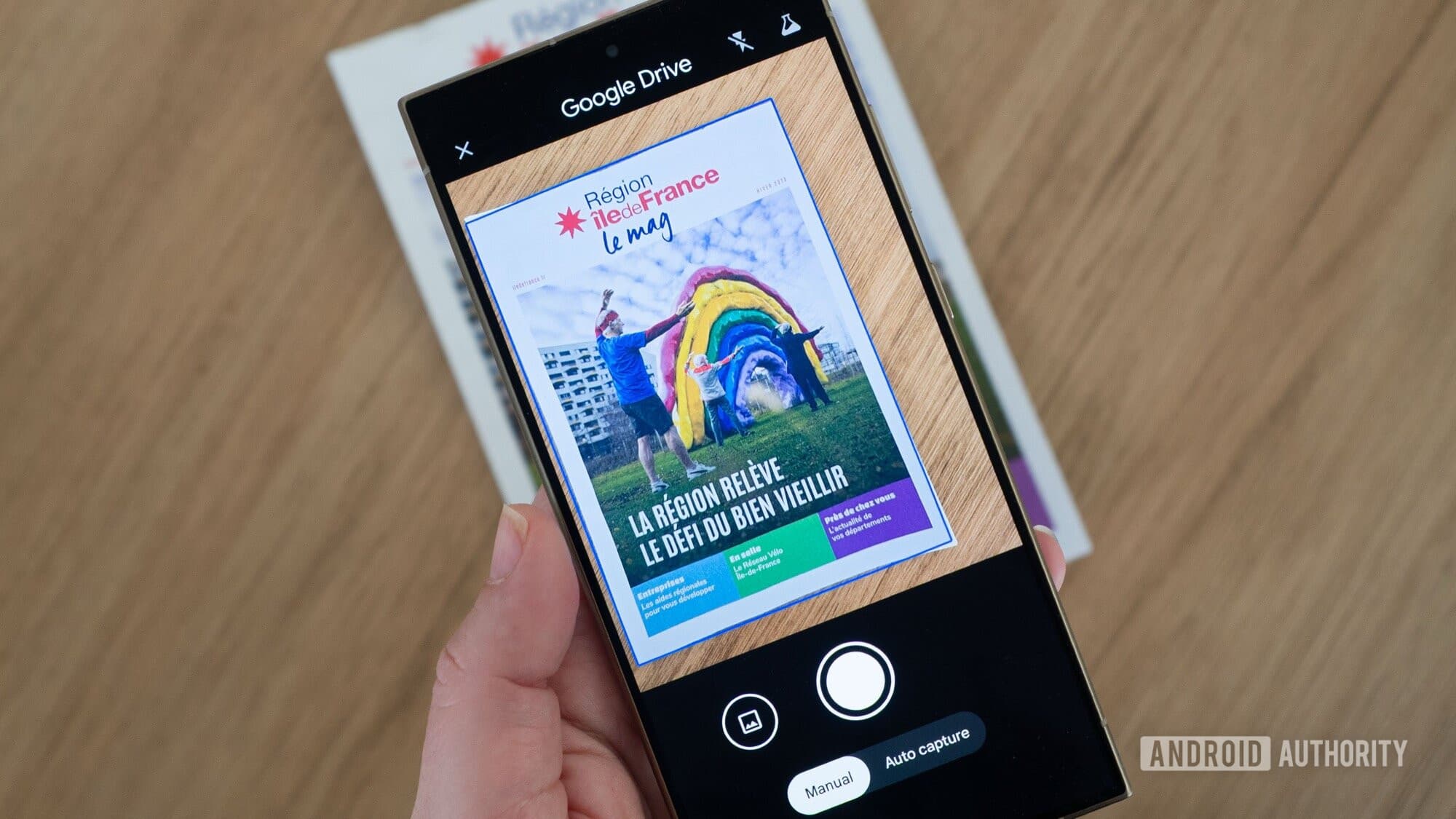
Google’s rolling out a big redesign for its built-in document scanner in Google Drive for Android. There’s a catch, though: your phone needs at least 8GB of RAM to use it. This update introduces on-device AI, so the scanner can automatically enhance blurry images, batch-scan multiple pages, and eliminate duplicate captures.
What’s Actually New
The previous Google Drive scanner was functional but pretty basic — just point, shoot, and save. The new version acts more like a smart document management tool. Here’s what’s different:
- Auto-blur correction: If you capture a page that’s slightly out of focus, the scanner automatically detects the blur and sharpens it.
- Duplicate detection: Accidentally scan the same page twice? The app catches it and removes the extra copy.
- Batch scanning: You can scan an entire multi-page document in one go, without confirming each page separately.
- Redesigned interface: The camera viewfinder and controls have a fresh layout, rebuilt from the ground up.
Think of it as the difference between a basic point-and-shoot camera and a modern smartphone camera that adjusts for lighting, removes red-eye, and alerts you when someone blinks. The basic task is the same, but the outcome is noticeably improved with much less hassle.
Why the 8GB RAM Requirement?
The AI processing that supports these features runs directly on your device, so your documents never get sent to Google’s servers. This is a win for privacy, but it also means your phone needs enough RAM to handle the processing demands.
Most budget and mid-range Android phones come with 4GB to 6GB of RAM. This means a significant number of Android users won’t qualify. Phones that do meet the requirement include recent flagship models like the Samsung Galaxy S24 series, Google Pixel 8 and newer, and most high-end devices released in 2024 or later.
Google started testing this redesign in September 2025, as reported by 9to5Google, and is now rolling it out to eligible devices more widely.
Who This Is For
Document scanning in Drive is popular among students, small business owners, and anyone who frequently digitizes paper — whether it’s receipts, contracts, tax forms, or handwritten notes. For these users, this upgrade is a big deal. Fixing a blurry scan right now means reshooting it manually. Finding duplicates in a 20-page document requires scrolling through the PDF afterward.
Google Drive boasts about 1 billion users across different platforms. While many users access Drive on desktop, the mobile scanner remains one of the most practical everyday tools for Android users.
| By The Numbers: Alphabet / Google | |
|---|---|
| Stock (GOOGL) | $375.35 (-1.31%) |
| CEO | Sundar Pichai |
| Headquarters | Mountain View, CA |
| Founded | 1998 |
| Minimum RAM for new scanner | 8GB |
| Scanner testing began | September 2025 |
What This Means for Everyday Users
If your Android phone has 8GB of RAM or more, you should get this update automatically through the Google Drive app — no action required. The scanner will work better the next time you use it.
If your phone has less than 8GB of RAM, you won’t see any changes. You’ll stick with the current scanner interface. Google hasn’t mentioned any plans to bring the AI features to lower-spec devices, likely because the on-device processing needs that extra memory to run smoothly.
For iPhone users, this update doesn’t apply. Google Drive on iOS uses Apple’s own document scanning system instead of its own.
The practical benefit for qualifying users is fewer do-overs. Scanning a multi-page contract or a stack of receipts becomes a quicker, single session instead of a slow, page-by-page process with quality checks along the way.
Community Reaction
“Finally. I’ve rescanned the same blurry page so many times. If this actually works, I’ll use Drive way more for documents.”
— Android Authority reader comment, May 2026
“Cool feature, but hard to get excited when half the Android market can’t run it. 8GB shouldn’t be the minimum for a document scanner.”
— Android Authority reader comment, May 2026
What To Watch
- Broader rollout: Google typically phases app updates over several weeks. If you’ve got a qualifying device and haven’t seen the new interface yet, expect it soon with a standard Google Drive app update.
- RAM requirement changes: As more mid-range phones start coming with 8GB of RAM as standard, this feature’s reach will expand without Google needing to do anything.
- Lower-spec support: Keep an eye out for whether Google releases a simplified version of the new interface without the AI features for devices with less than 8GB — they haven’t announced this yet, but it seems like a logical next step.
- iOS parity: Google usually brings major Drive features to iPhone eventually, though the timing can vary. There’s no iOS version of this upgrade announced yet.
Sources: Android Authority, 9to5Google

Maya Torres
Maya Torres is the Consumer Tech Editor at Explosion.com with 7 years covering product launches for major technology publications. She has reviewed over 300 devices across smartphones, laptops, wearables, and smart home products. Maya specializes in translating spec sheets into real-world buying advice and attends CES, MWC, and Apple keynotes as press. Her reviews focus on helping readers decide what to buy, not just what specs look good on paper.


