
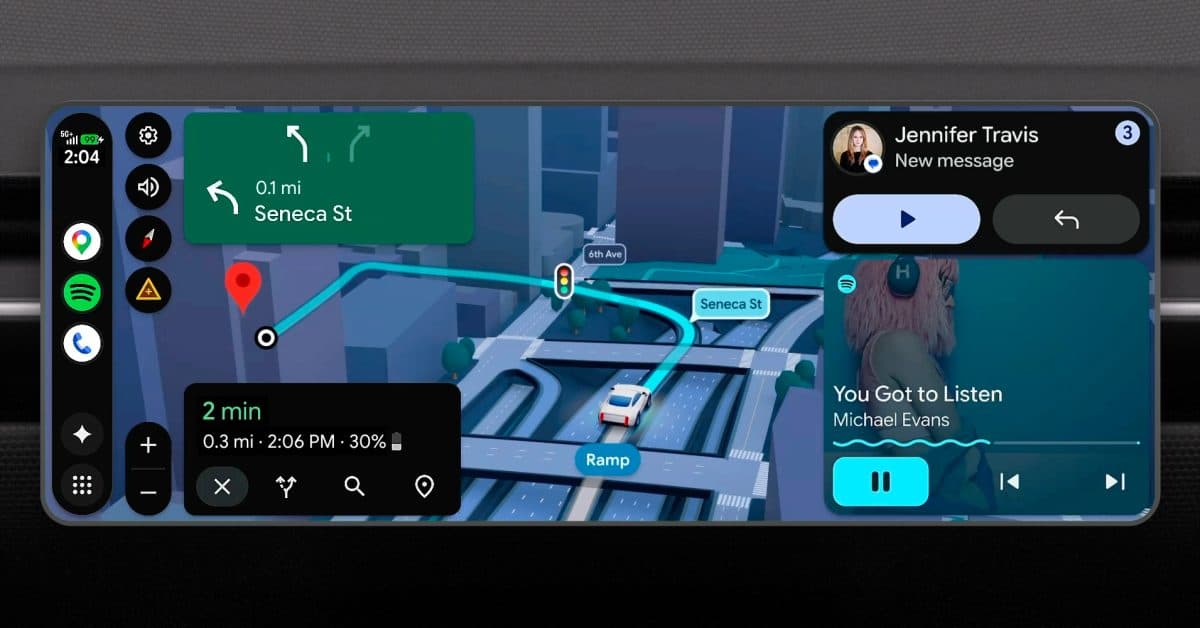
Google’s giving Android Auto a major facelift with a new full-screen design that will cover your entire car display. This update introduces home screen widgets and incorporates the Material 3 Expressive design language (Google’s latest visual style system, which focuses on rounder shapes and bolder colors) into your dashboard for the first time.
What’s Actually Changing
The most obvious change is that Android Auto will now utilize your entire screen. Currently, the interface leaves behind black bars on many car displays, especially on wider or taller screens. The new layout fills the whole panel, which might seem minor until you’re staring at a 12-inch infotainment screen with a chunk of it blacked out.
In addition to the layout improvement, Google is bringing widget support to the Android Auto home screen. Think of widgets like the ones on your phone’s home screen — small cards that display live information without needing to open a full app. In your car, this could show your estimated arrival time, your next calendar event, or your music queue all at once, without needing to switch screens.
This redesign also introduces Google’s Material 3 Expressive design to the car dashboard. Material 3 Expressive started rolling out earlier this year on phones, featuring softer button shapes, dynamic color theming, and smoother animations. Now, Android Auto users will finally get to enjoy the same enhancements.
The Bigger Picture: YouTube While Parked
This redesign isn’t happening in a vacuum. Google has also confirmed that Android Auto now allows YouTube streaming while the vehicle is parked. This is a great addition for anyone stuck in a parking lot, waiting at a charging station, or sitting in a long school pickup line. Your car display will transform into a proper video screen, not just a navigation and audio tool.
Combined, the widgets and YouTube streaming show Google’s shift in how they view Android Auto. They’re treating it less like a basic phone interface and more like a full-fledged platform. Think of it as Android Auto evolving from just a GPS with music controls to something more like a co-pilot dashboard.
| Android Auto Redesign: By The Numbers | |
|---|---|
| Supported display types | All screen sizes and aspect ratios (full-screen layout) |
| New feature: Widgets | Home screen widgets for at-a-glance info |
| Design system | Material 3 Expressive (Google’s 2025-2026 visual language) |
| Video streaming | YouTube supported while vehicle is parked |
| Android Auto active users | 200+ million vehicles globally (Google, 2024) |
What This Means For Everyday Drivers
If you connect your phone to your car via USB or Bluetooth and use Android Auto regularly, this update is generally great news. The full-screen layout means less wasted space on modern wide displays. Plus, widgets let you access the information you need while driving with fewer taps, which genuinely improves safety. Every second your eyes stay on the road counts.
The YouTube feature is niche but handy. It only works while parked, so Google isn’t promoting watching videos while driving. However, for electric vehicle drivers during long charging sessions, or parents waiting in school pickup lines, having a proper video option beats squinting at a phone on the dash.
Keep in mind that redesigns like this often roll out gradually. You might not see the new interface right on the day Google announces it. Previous Android Auto updates have typically taken weeks to reach all users.
What Drivers Are Saying
“Finally, they’re fixing the black bars. I have a 2023 Hyundai with a wide screen, and Android Auto looks terrible on it right now. This should’ve been fixed years ago.”
— u/TarmacTraveller, r/AndroidAuto
“Widgets on the home screen are genuinely useful. Being able to see my ETA and next stop without tapping anything is exactly what I wanted. YouTube while parked is a bonus I didn’t know I needed.”
— YouTube comment on Android Auto redesign announcement video
Sources and Further Reading
- Full breakdown of the Android Auto redesign features (9to5Google)
- Google’s other new Android feature targeting screen habits (Android Authority)
What To Watch
- Rollout timing: Google hasn’t confirmed an exact date for the redesign to reach all Android Auto users. Look for a staged rollout beginning in late May or June 2026.
- App compatibility: Third-party apps will need to update their Android Auto interfaces to make the most of the new full-screen layout and widget slots. Expect major apps like Spotify and Waze to be early adopters.
- Google I/O follow-up: Google’s developer conference usually reveals more details on platform updates like this. Additional Android Auto announcements may come in the next few weeks.
- Carplay response: Apple’s CarPlay has promised its own major overhaul for two years. Android Auto’s visible improvements might push Apple to speed up its timeline.

Daniel Park
Daniel Park covers AI, cloud infrastructure, and enterprise software for Explosion.com. A former software engineer who transitioned to technology journalism 5 years ago, Daniel brings technical depth to his reporting on artificial intelligence, startup funding rounds, and the companies building the future of computing. He breaks down complex AI developments and business strategies into clear, actionable insights for readers who want to understand how technology is reshaping industries.


