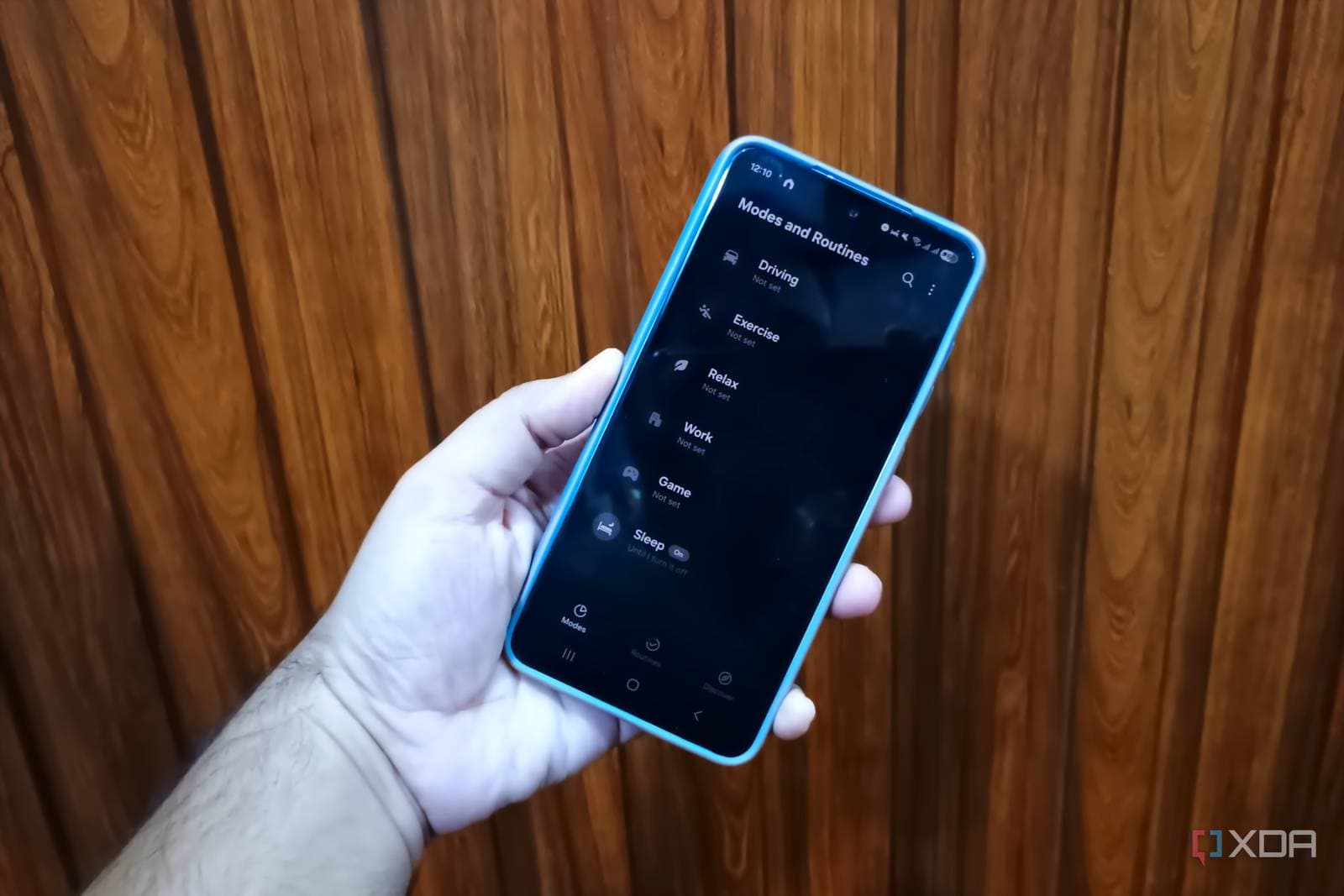
Samsung’s Modes and Routines, an automation tool built into Galaxy phones, can take on many tasks that used to require the third-party app Tasker. A recent hands-on piece from XDA Developers describes it as a user-friendly suite with sleep and gaming profiles that automatically adjust your phone settings. You won’t need to download anything to give it a try.
What Modes and Routines Actually Does
Automation lets your phone do things automatically when certain conditions are met. Samsung divides its version into two categories.
Modes
Modes are preset profiles for specific scenarios, like sleeping or gaming. You can think of them like scene buttons on a smart lighting system. One tap or trigger changes multiple settings at once, so you won’t have to adjust each one manually. XDA particularly highlights the sleep and gaming profiles.
Routines
Routines operate on an “if this, then that” principle. You choose a trigger—like a specific time, a location, or connecting to a Bluetooth device—and then set what happens next. For instance, you could program your phone to silence notifications every night at a designated time. You can find both tools in your Galaxy phone’s Settings app under “Modes and Routines.”
Why Tasker Fans Are Paying Attention
Tasker has been a popular Android automation app for a long time. It links triggers to actions across your phone, offering high flexibility. However, it does come with a steep learning curve. If Tasker is like a giant box of loose LEGO bricks without instructions, Modes and Routines is more like a kit with the main pieces already assembled and a clear menu for swapping parts.
This trade-off is at the heart of the XDA argument. A polished built-in tool that meets everyday needs can be more beneficial than a more powerful tool that takes hours to master. Power users who crave deep, custom control might still lean toward Tasker, but the article argues that many people don’t need that level of complexity.
By The Numbers
| Samsung at a Glance | |
|---|---|
| Company | Samsung |
| Ticker | 005930.KS |
| Share price | 223,500 (+5.67%), as listed in the data provided |
| Sector | Hardware |
| CEO | Jong-Hee Han |
| Headquarters | Seoul, South Korea |
| Founded | 1938 |
What This Means
If you own a Galaxy phone, you might already have a free automation tool you haven’t explored yet. Many users only interact with features like Do Not Disturb or battery saver. Modes and Routines can bundle those habits into automatic processes.
Here are a few practical ideas based on the profiles XDA describes:
- Bedtime: A sleep Mode can mute alerts and change settings on a schedule, so you don’t have to do it manually each night.
- Gaming: A gaming profile can adjust settings when you start a session, so you’re not digging through menus first.
- Daily habits: A Routine can activate when you arrive at a location or connect to a device.
The main takeaway here is accessibility. Automation used to be something only enthusiasts tackled with extra apps and lots of patience. Now, built-in settings make it easy for anyone to use.
Samsung’s Software Updates Keep Rolling
This news comes as Samsung continues rolling out new software for its devices. 9to5Google reports that Samsung is pushing its One UI 9 update, bringing Android 17 features to a wide range of Galaxy devices, including popular mid-range models. One UI is Samsung’s custom software layer on top of Android, which includes features like Modes and Routines.
The source summary doesn’t specify how the update affects Modes and Routines, so it’s a good idea to check your phone after updating to see if anything has changed. Samsung’s hardware ambitions also extend beyond phones. Android Authority points out that Samsung’s first Android XR glasses face a design challenge that rival Ray-Ban Meta has already addressed. Their summary emphasizes that the technology is crucial, but the design of the glasses matters just as much.
Community Reaction
No Reddit or YouTube reactions were available for this story at the time of writing, so there aren’t any community quotes to share yet. Overall sentiment in the data is mixed, with no total signals, which is too little to draw any conclusions.
What To Watch
- One UI 9 and Android 17 rollout: Samsung continues delivering updates across Galaxy devices. Check Settings, then Software update, to see if yours is available.
- Feature changes after updating: Take a look at Modes and Routines once your phone updates to see if new options have appeared.
- Samsung’s Android XR glasses: Keep an eye out for more details on how Samsung handles the design issue that Android Authority mentions.
For now, the simplest and cheapest step you can take is to open Settings on your Galaxy phone, tap Modes and Routines, and try out one preset. If it saves you a few taps each day, you’ve found your answer.

Maya Torres
Maya Torres is the Consumer Tech Editor at Explosion.com with 7 years covering product launches for major technology publications. She has reviewed over 300 devices across smartphones, laptops, wearables, and smart home products. Maya specializes in translating spec sheets into real-world buying advice and attends CES, MWC, and Apple keynotes as press. Her reviews focus on helping readers decide what to buy, not just what specs look good on paper.