
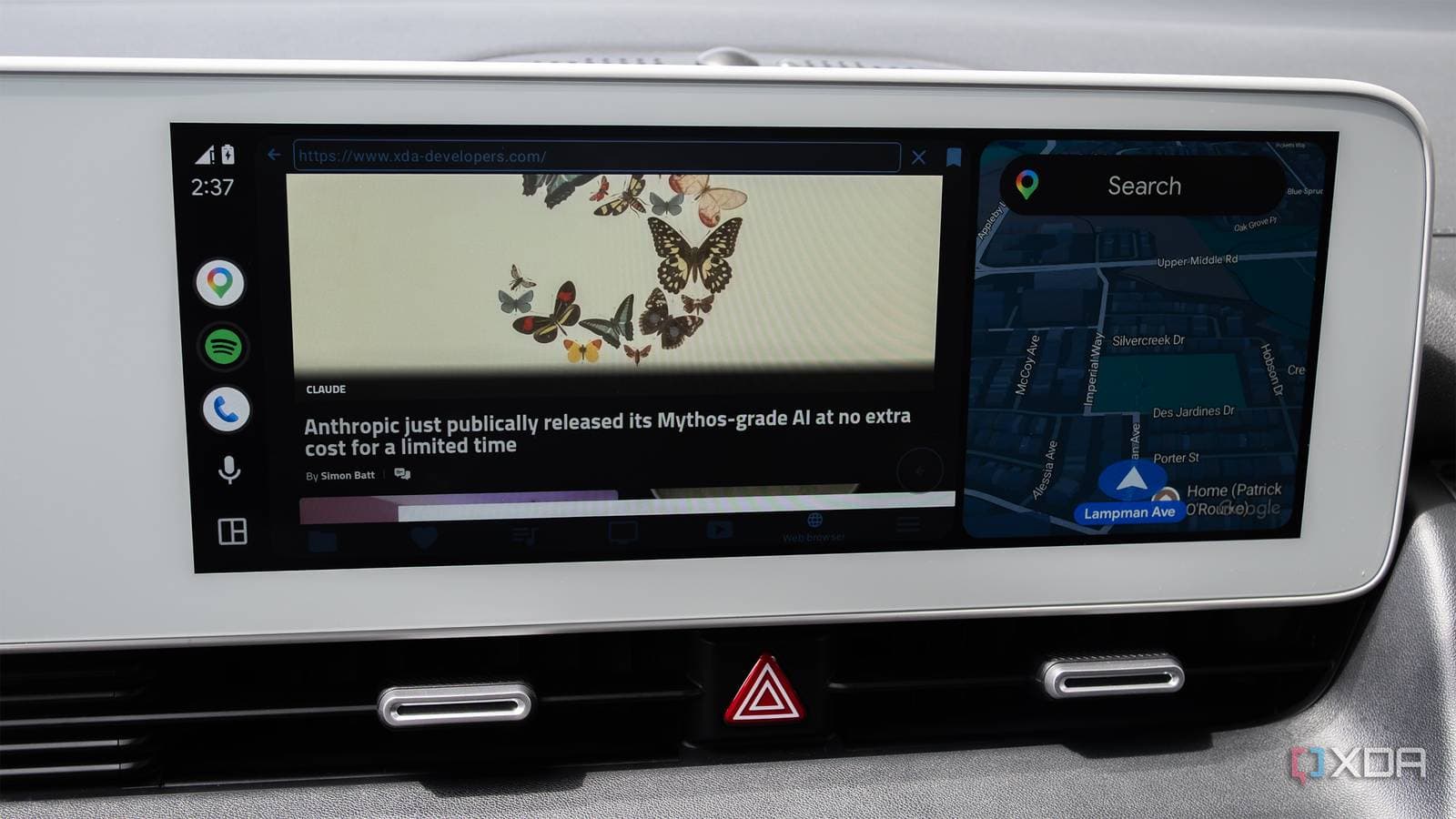
A free, unofficial Android Auto app called Fermata Auto is transforming car touchscreens into full-fledged media players. However, installing it requires a workaround that Google hasn’t officially endorsed.
What Is Fermata Auto?
Android Auto is Google’s system that mirrors a simplified version of your phone onto your car’s built-in screen. By default, it only allows a curated list of approved apps to run on that display. Fermata Auto bypasses these restrictions by being sideloaded, which means you install it manually outside of the Google Play Store.
Imagine this: Google gives you a walled garden on your car screen, but Fermata Auto opens a side gate.
Once you install the app, it lets you browse and play local media files stored on your phone directly through your car’s display. Whether it’s videos, music files, or audiobooks sitting in folders, everything becomes accessible through a user-friendly interface designed for driving. The official Android Auto ecosystem doesn’t adequately address this need, often pushing users toward streaming services like Spotify or YouTube Music instead of locally stored files.
Why Does This Matter?
Most people overlook local media these days, but there are times when it really matters. Think about long road trips through areas with poor cell coverage or international travel where data roaming can get pricey. Plus, many folks have huge collections of downloaded podcasts and audiobooks that aren’t tied to any single app. Fermata Auto handles all of these scenarios without needing an internet connection.
According to XDA Developers, which highlighted the app as a must-have for daily drivers, Fermata Auto supports a variety of file formats. It presents them in a layout that’s easy to navigate while you keep your eyes on the road. Its interface is designed with larger touch targets and simplified menus that Android Auto requires.
How Do You Actually Install It?
Sideloading on Android involves enabling a setting called “Install unknown apps” in your phone’s security settings. After that, you download the app’s APK file (the Android equivalent of a Windows .exe installer) directly from the developer. It’s a few extra steps compared to just tapping “Install” on the Play Store, but it’s a well-established process that Android has supported for years.
The downside is that sideloaded apps on Android Auto exist in a gray area. Over the years, Google has tightened restrictions on which apps can show up on car screens due to safety concerns. Fermata Auto works by leveraging legitimate developer-mode features, not exploiting any security vulnerability. So, it’s not doing anything harmful, but it’s also not officially supported by Google.
The Timing Is a Little Bumpy
Interest in third-party Android Auto solutions is rising right now, partly because the official app has been experiencing issues. According to 9to5Google, recent Android Auto updates have led to crashes for many users, with complaints popping up on forums and social media. When the official experience isn’t stable, people start exploring alternatives.
| Fermata Auto: Quick Facts | |
|---|---|
| Cost | Free |
| Installation method | Sideload (APK, outside Play Store) |
| Primary use | Local media playback on Android Auto |
| Internet required | No — works fully offline |
| Official Google support | None |
What This Means
For everyday drivers, Fermata Auto fills a real gap in what Android Auto offers. If you’ve ever felt frustrated that your car screen can stream music from various services but can’t play a video file you downloaded or an audiobook saved on your phone, this is the solution. It’s especially handy on long trips, letting you queue up local content without burning through mobile data or worrying about dead zones.
The broader issue is that Android Auto’s walled garden approach — while understandable for safety and quality control — leaves users looking for workarounds for basic functionality. Fermata Auto’s popularity indicates a strong demand for local media support that Google hasn’t addressed through official channels.
What People Are Saying
“Been using Fermata for about six months. It’s the only reason I don’t miss CarPlay. Local video and music playback on a road trip with no signal is a game changer.”
— u/drivewithdata, Reddit r/AndroidAuto
“Didn’t think I needed this until I tried it. Now I have all my kids’ downloaded shows accessible on the screen for long drives. Works perfectly.”
— YouTube comment on XDA Developers’ Fermata Auto coverage
What To Watch
- Android Auto stability fixes: Google hasn’t issued a formal patch for the crashes from recent updates. A fix might come in the next point release, but there’s no timeline yet.
- Google’s stance on sideloading: Google has periodically cracked down on unofficial Android Auto apps. It’s worth keeping an eye on whether Fermata Auto continues to work through future Android Auto updates.
- Official local media support: If user demand keeps growing, Google might eventually address local file playback through official Android Auto features — though nothing is currently planned.
Sources: XDA Developers on Fermata Auto | 9to5Google on Android Auto crashes

Daniel Park
Daniel Park covers AI, cloud infrastructure, and enterprise software for Explosion.com. A former software engineer who transitioned to technology journalism 5 years ago, Daniel brings technical depth to his reporting on artificial intelligence, startup funding rounds, and the companies building the future of computing. He breaks down complex AI developments and business strategies into clear, actionable insights for readers who want to understand how technology is reshaping industries.


