
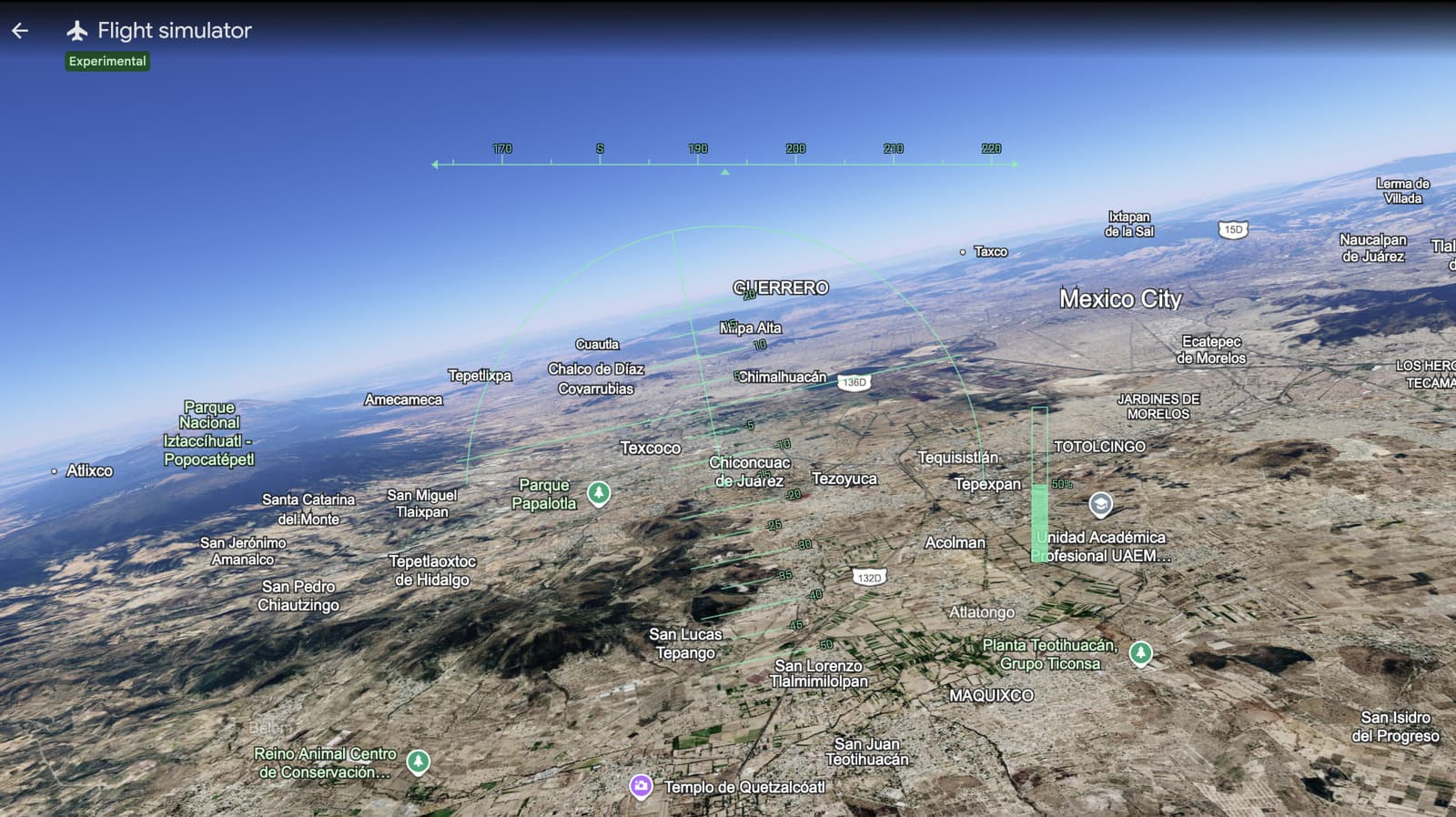
Google has now made its hidden flight simulator feature available in the browser version of Google Earth. This means you can soar over any location on Earth without needing to download an app. Previously, this feature was exclusive to the desktop app, but it’s now accessible at earth.google.com.
What Is Google Earth’s Flight Simulator?
If you’re unfamiliar with it, here’s a quick rundown: Google Earth has included a flight simulator in its desktop app since 2007. It allows you to fly a virtual aircraft over Google’s satellite images of the real world. You can zoom over your hometown, explore famous coastlines, or attempt to land at an airport on your bucket list. Think of it as a more casual version of Microsoft Flight Simulator, offering less realism but no cost and no setup required.
Before this, you had to download the Google Earth desktop app, which isn’t appealing to everyone. Now, moving it to the browser eliminates that hurdle entirely. If you have Chrome or another modern browser and internet access, you’re ready to go.
How to Get Started
Getting into the simulator is easy and takes just a few clicks:
- Visit earth.google.com in your browser.
- Click the menu icon (the three horizontal lines in the top-left corner).
- Select Voyager, then look for the Flight Simulator option.
- Pick your aircraft and starting location, then launch.
You’ll use your keyboard and mouse to control the flight. Basic inputs include the arrow keys to steer, Page Up to increase throttle, and Page Down to decrease it. While it won’t replace a full flight simulator setup with a joystick and pedals, it does a surprisingly good job for casual flying over recognizable landmarks.
What Aircraft Can You Fly?
The simulator features two aircraft options: an F-16 fighter jet and a more beginner-friendly SR22 propeller plane from Cirrus Aircraft. New users will likely want to start with the SR22. The F-16 is so fast that you might find yourself staring at the ocean from 30,000 feet before you even know how to turn!
Why This Matters Now
Google hasn’t explained why this feature is launching in browsers right now, but it aligns with a larger goal of making Google Earth more accessible and web-based. Browser tools don’t require installation, automatic updates, or compatibility checks, making it easier for casual users to jump in.
This is particularly beneficial for schools and educators. Many school computers limit software installations, but browser-based tools usually bypass those restrictions. A geography teacher could now show students what the Amazon River looks like from a low-altitude flyover without needing to file an IT request.
| Detail | Info |
|---|---|
| Parent Company | Alphabet Inc. (GOOGL) |
| Stock Price | $368.03 (+1.17%) |
| CEO | Sundar Pichai |
| Headquarters | Mountain View, CA |
| Founded | 1998 |
| Flight Sim Originally Added | 2007 (desktop app) |
| Aircraft Available | 2 (F-16, Cirrus SR22) |
| Cost to Access | Free |
What This Means
For everyday users, this is a free and easy way to spend an afternoon exploring the world from the air. You could line up an approach to Tokyo’s Haneda Airport, fly through the Grand Canyon, or see what your neighborhood looks like from a few thousand feet up—all within a browser tab. While it won’t replace serious flight simulators for enthusiasts, it offers a genuinely fun experience for curious casual users who didn’t even know this feature existed.
This also highlights how impressive Google Earth remains. In an age filled with flashy AI announcements, Google continues to provide a free tool that allows anyone to explore the planet in 3D, and it’s becoming more accessible all the time.
Community Reactions
“I completely forgot this existed. Just spent 20 minutes trying to land at LAX and failed every time. 10/10 would recommend.”
“This is actually fantastic for kids learning geography. Way more engaging than just looking at maps. My students are going to love this.”
Sources
- CNET: Google Earth’s Flight Simulator Is Now on Browsers: Here’s How to Play
- Engadget: Google Earth’s flight simulator mode is now available in your browser
What To Watch
- Feature updates: Google hasn’t confirmed whether new aircraft or improved controls are coming to the browser version. Keep an eye on Google Earth’s official blog and social channels for updates.
- Performance improvements: Browser-based 3D rendering can be taxing on older hardware. It’s worth watching to see if Google optimizes the experience for lower-end devices in the months ahead.
- Google I/O and Earth updates: Google has been gradually enhancing Earth’s browser capabilities. Future developer events might indicate whether deeper simulator features, like weather effects or multiplayer, are on the horizon.

Daniel Park
Daniel Park covers AI, cloud infrastructure, and enterprise software for Explosion.com. A former software engineer who transitioned to technology journalism 5 years ago, Daniel brings technical depth to his reporting on artificial intelligence, startup funding rounds, and the companies building the future of computing. He breaks down complex AI developments and business strategies into clear, actionable insights for readers who want to understand how technology is reshaping industries.


