
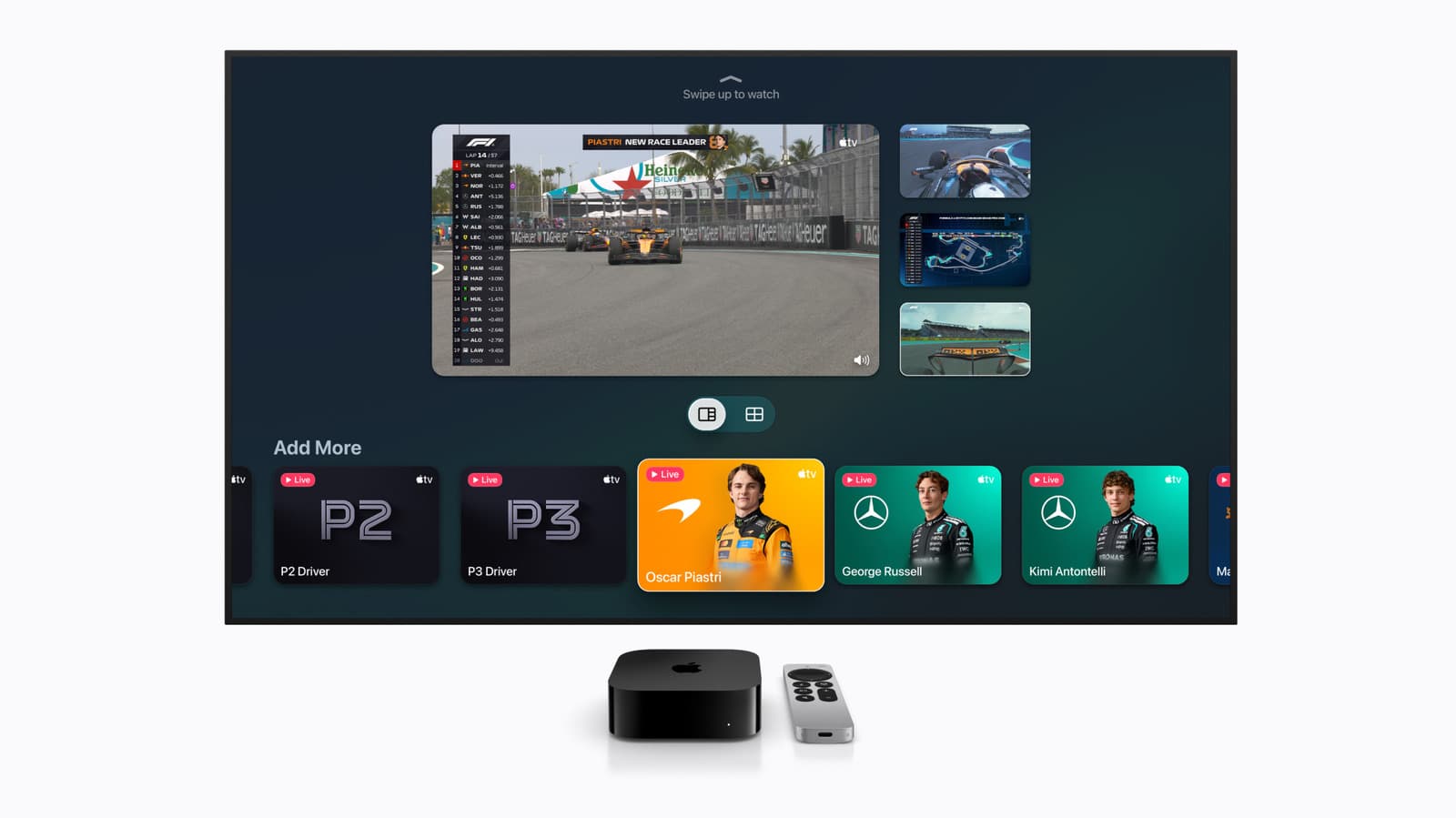
With Apple TV 4K, you can watch up to four live sports streams at once on your screen. Setting it up is easier than most sports fans think. Whether you’re keeping an eye on multiple games during playoffs or switching between different leagues, Apple’s multiview feature transforms your TV into a sports hub.
What Is Multiview, Exactly?
Multiview is a picture-in-picture feature that lets you split your display into four equal sections, each showing a different live broadcast. Apple rolled this out for Apple TV 4K as part of its focus on live sports, and it works with several major streaming apps.
The important part? It only works with live events. You can’t use it for recorded games or on-demand content. If the game isn’t live, it won’t show up in the split view.
Which Sports and Apps Are Supported?
Not all sports apps support multiview. Right now, it works with Apple TV channels and apps that have enabled the feature, like ESPN, the MLB app, and Apple’s own MLS Season Pass and Friday Night Baseball through Apple TV+. NBA League Pass and NFL Sunday Ticket have also supported it during their seasons.
In short, if a sports app streams live games through the Apple TV app ecosystem, it likely supports multiview. However, apps that operate outside Apple’s TV app, like some international league services, might not be compatible.
How to Set It Up
Getting multiview going takes about 30 seconds once you know the steps.
Step 1: Start a Live Game
Open any supported app and start streaming a live event. Make sure you’re in full-screen mode first before adding more feeds.
Step 2: Open the Info Panel
While the game plays, swipe down on the Siri Remote’s touch-sensitive surface to access the player controls. Look for the multiview icon, which looks like four small squares in a grid.
Step 3: Add More Streams
Tap the multiview icon, and Apple TV will show you other live events currently available. You can select up to three more to fill the rest of the slots. The system automatically suggests options from your subscribed apps.
Step 4: Switch Audio Between Feeds
Only one stream will play audio at a time. To change which game you’re listening to, click on that section of the screen with the remote. A highlighted border will appear around the active audio source, so you’ll always know which commentary you’re hearing.
Tips for Getting the Most Out of Multiview
Here are a few things to keep in mind before your next big sports Sunday:
- Internet speed matters. Streaming four HD feeds at once requires a strong connection. Apple recommends at least 25 Mbps (megabits per second) for a smooth experience. If you’re experiencing buffering, consider dropping one stream or checking your router.
- Not all Apple TVs support it. You’ll need an Apple TV 4K (either second or third generation). The older Apple TV HD box doesn’t support multiview.
- Subscriptions still apply. Multiview doesn’t grant access to content you haven’t paid for. If a game is behind a paywall, it won’t show up as an option.
What About Non-Apple TV Users?
If you’re using a smart TV, Roku, Fire Stick, or another device, you won’t find native multiview through Apple’s system. Your best bet is to use a laptop or tablet with multiple browser tabs open, or find a smart TV with its own built-in split-screen feature (Samsung and LG have this on select models).
| Apple — By The Numbers | |
|---|---|
| Stock (AAPL) | $298.01 (+0.70%) |
| CEO | Tim Cook |
| Headquarters | Cupertino, CA |
| Founded | 1976 |
| Max Multiview Feeds | 4 simultaneous live streams |
| Compatible Hardware | Apple TV 4K (2nd & 3rd gen) |
| Minimum Recommended Speed | 25 Mbps |
What This Means for Everyday Users
For casual sports fans, multiview eliminates the need for constant channel-flipping while tracking several games. You won’t miss a touchdown while watching a basketball play; both moments can be on your screen at the same time. This feature is especially handy during busy periods like NFL Sundays, NBA playoff days, or baseball doubleheaders when several meaningful games overlap.
However, there’s a tradeoff with screen real estate. On a 55-inch TV, four feeds mean each game gets about the same space as a 27-inch monitor. Smaller TVs may make it harder to follow the action clearly. For the best experience, consider a 65-inch screen or larger.
Apple is also promoting multiview as a selling point for its expanding live sports library through Apple TV+. This includes MLS Season Pass and select MLB games. If you’re juggling multiple sports loyalties, this feature makes those subscriptions feel more worthwhile.
Community Reactions
“Finally used multiview for the first time during the MLB playoffs. Genuinely changed how I watch baseball. Wish it worked with more apps though.”
“The audio switching is actually really smooth. My only gripe is that you can’t customize which corner each feed sits in.”
What To Watch
- Fall 2025 sports seasons: NFL Sunday and NBA tip-off will be the ultimate tests of multiview’s performance under heavy streaming loads across millions of households.
- App compatibility expansion: Keep an eye out for announcements from streaming services like Peacock (which features NFL and Premier League games) about adding multiview support.
- tvOS updates: Apple typically releases Apple TV software updates alongside major iPhone releases each fall. New multiview controls or expanded app support could arrive then.
- Competing features: Amazon and Google are both enhancing live sports streaming. Whether Roku or Fire TV devices will get similar split-screen tools is something to watch in the coming months.
Sources: Engadget: Apple TV 4K multiview guide | CNET: Apple TV+ content coverage

Daniel Park
Daniel Park covers AI, cloud infrastructure, and enterprise software for Explosion.com. A former software engineer who transitioned to technology journalism 5 years ago, Daniel brings technical depth to his reporting on artificial intelligence, startup funding rounds, and the companies building the future of computing. He breaks down complex AI developments and business strategies into clear, actionable insights for readers who want to understand how technology is reshaping industries.


