
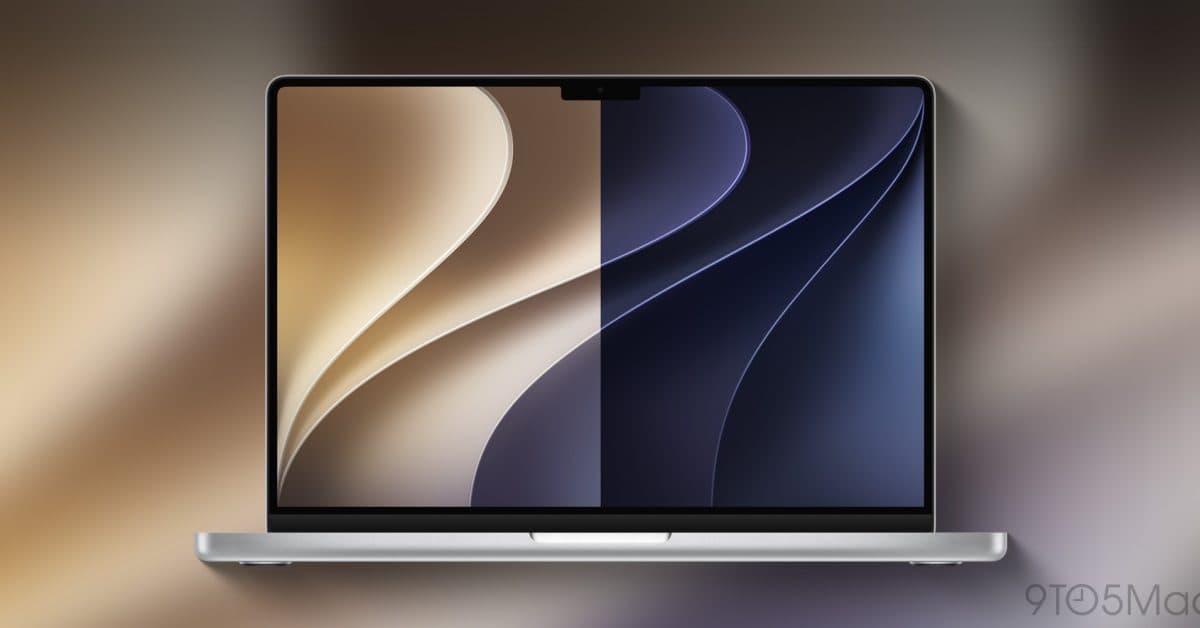
Apple dropped the first developer betas for iOS 27, iPadOS 27, and macOS 27 Golden Gate on June 8, 2026, right after the WWDC 2026 keynote. You can install them on your device today without waiting for the public release this fall.
These betas offer early access to a major Siri upgrade, a redesigned Wallet app, Spatial Reframing for videos, and a new set of macOS wallpapers inspired by San Francisco’s Golden Gate Bridge. Here’s how to get them.
What’s Actually New in These Betas
Before diving in, let’s cover what you can expect. The standout feature across all three platforms is the revamped Siri AI, which Apple unveiled at WWDC after years of gradual updates. This version of Siri can tackle more complex, multi-step requests and understands context across apps. Think of it as moving from a basic voice assistant to a more personalized assistant that remembers what you asked just minutes ago.
Here are some other key additions:
- Spatial Reframing — This video feature automatically adjusts footage shot in one aspect ratio to fit another. It’s especially handy if you shoot vertical videos and want them to look great on a widescreen TV.
- Wallet’s “Create a Pass” feature — With iOS 27, you can scan a physical ticket, membership card, or event pass using Visual Intelligence (Apple’s on-device image recognition system) and add a digital version directly to your Wallet app.
- macOS 27 Golden Gate wallpapers — A fresh set of official wallpapers themed around the Golden Gate Bridge is now available for download.
Before You Install: What You Need to Know
Keep in mind that developer betas are early and unfinished software. They’re like a rough draft of the operating system. Most things work, but you might encounter bugs, crashes, and battery drain. Apple primarily releases these for app developers to test their software ahead of the public launch, not as a polished consumer experience.
Back up your device first. Seriously, do it. Use iCloud Backup or connect to a Mac and back up through Finder before you start with any beta software.
Also, check compatibility. macOS 27 Golden Gate drops support for all Intel-based Macs. Only Apple Silicon machines (those with M1 chips or newer, released from late 2020 onward) can run it. If your Mac is from 2020 or earlier, check Apple’s compatibility list before moving forward. For iPhones and iPads, compatible devices mostly mirror the iOS 26 lineup.
| By The Numbers: WWDC 2026 Beta Release | |
|---|---|
| Beta released | June 8, 2026 |
| Platforms available | iOS 27, iPadOS 27, macOS 27 Golden Gate |
| macOS chip requirement | Apple Silicon only (M1 or newer) |
| Expected public release | Fall 2026 |
| Key new feature | Redesigned Siri AI with multi-step requests |
How to Download the iOS 27 Developer Beta
You don’t need a paid Apple Developer account to access developer betas anymore — Apple opened this up a few years back. Here’s how to get it on your iPhone:
- Open Settings on your iPhone.
- Tap General, then Software Update.
- Tap Beta Updates at the top of the screen.
- Select iOS 27 Developer Beta from the list.
- Go back to Software Update and tap Download and Install.
Use the same steps for iPadOS 27 on an iPad. The download usually ranges from 3–6 GB, so connect to Wi-Fi and plug in your charger before you kick things off.
How to Download macOS 27 Golden Gate Beta
For a compatible Apple Silicon Mac:
- Open System Settings (the gear icon in your dock or Apple menu).
- Click General, then Software Update.
- Click the info button (ⓘ) next to Beta Updates.
- Select macOS 27 Developer Beta.
- Follow the prompts to download and install.
If you’re a developer with an active Apple Developer Program membership, you can download the beta profile directly from developer.apple.com. You can also grab the new macOS 27 Golden Gate wallpapers separately from 9to5Mac if you want the fresh look without installing the entire beta.
What This Means for Everyday Users
If you’re not a developer, the best advice is to wait for the public beta, which Apple usually releases about a month after the developer beta. That version is more stable and still gives you early access to everything shown at WWDC.
If you don’t mind occasional bugs and have a spare device (or a solid backup), installing now gets you the new Siri AI, the Wallet pass scanner, and Spatial Reframing weeks before most users. For the average iPhone user, the Wallet update alone could be super handy — no more searching for a PDF of your gym membership card.
The macOS compatibility cut means Intel Mac owners won’t be able to upgrade this time. If your MacBook or iMac has an Intel processor, you’ll miss out on macOS 27 entirely. CNET has the complete list of compatible Macs if you want to verify your specific model.
Community Reactions
“Installed iOS 27 beta on my 16 Pro about an hour after the keynote. The new Siri is genuinely different — asked it to find a reservation email and add it to my calendar and it just… did it. No steps.”
— u/thermal_paste_guy, r/apple
“If you have an Intel Mac this is rough. My 2019 MacBook Pro is basically a paperweight for new OS features now. Time to upgrade I guess.”
— YouTube comment on 9to5Mac’s WWDC recap video
What To Watch
- Public beta launch — Apple usually opens the public beta program in July, about four to six weeks after the developer beta. This version is what most non-developers should wait for.
- Beta 2 and beyond — Expect Apple to roll out updated developer betas roughly every two weeks throughout the summer, each one more stable than the last.
- watchOS 27 compatibility — Apple already confirmed it’s dropping support for Apple Watch models from 2022 and 2023, so keep an eye out for the final compatible device list.
- Fall 2026 public release — The finished versions of iOS 27, iPadOS 27, and macOS 27 are likely to launch alongside new iPhone hardware, probably in September 2026.
For a detailed step-by-step breakdown with screenshots, CNET’s guide walks through every screen.

Maya Torres
Maya Torres is the Consumer Tech Editor at Explosion.com with 7 years covering product launches for major technology publications. She has reviewed over 300 devices across smartphones, laptops, wearables, and smart home products. Maya specializes in translating spec sheets into real-world buying advice and attends CES, MWC, and Apple keynotes as press. Her reviews focus on helping readers decide what to buy, not just what specs look good on paper.


