
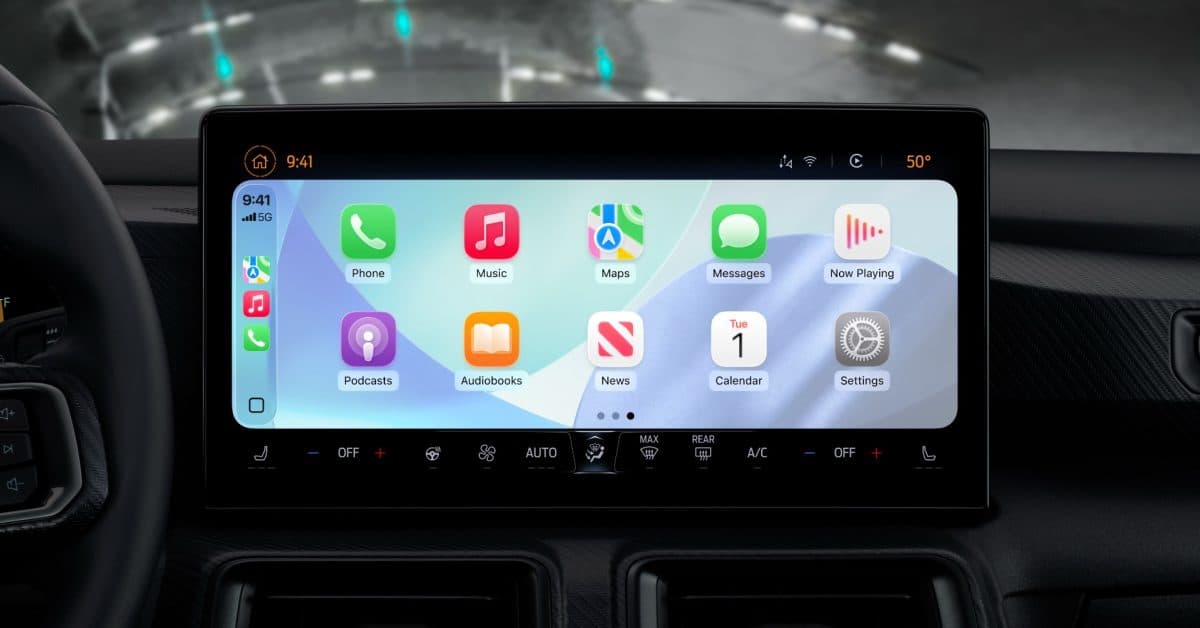
Apple’s iOS 26 has quietly introduced a long-awaited CarPlay feature. Now, drivers can control whether their iPhone connects to CarPlay automatically when plugged into a car. This has been a request from users for years.
What’s New in CarPlay With iOS 26
If you’ve ever plugged your iPhone into a USB port just to charge, only to have CarPlay hijack your car’s display, this update is for you. iOS 26 adds a toggle that lets you choose whether CarPlay starts automatically when your phone connects via USB or if you want to activate it manually.
This might seem minor, but for many drivers, it’s a daily annoyance. You plug in at a gas station, in a parking lot, or hand your phone to a passenger for charging — and CarPlay takes over the screen without your consent.
You can find the new setting in the CarPlay section of the iPhone’s Settings app. Apple hasn’t made a fuss about it, which isn’t surprising given their history of addressing issues that should have been resolved long ago.
Why It Took So Long
CarPlay debuted back in 2014, meaning drivers have gone over ten years without this essential control. It’s like a TV that switches inputs every time you plug in an HDMI cable — handy when you want it, frustrating when you don’t.
Apple is also refreshing CarPlay in iOS 26 with a visual redesign that features their new Liquid Glass design language. This sleek, layered interface style extends throughout iOS 26. While the auto-connect toggle is a smaller addition, it’s arguably more practical than the aesthetic changes.
How to Find the New Setting
If you’ve got iOS 26, here’s how to find the setting:
- Open Settings on your iPhone
- Scroll down to General
- Tap CarPlay
- Select your car and look for the automatic connection toggle
The label might vary a bit depending on your vehicle’s CarPlay setup, but you should see the option once your car is paired.
| CarPlay By The Numbers | |
|---|---|
| Year CarPlay launched | 2014 |
| Years without manual connection toggle | 12+ |
| Compatible vehicle models (as of 2025) | 800+ |
| iOS 26 public release | Fall 2026 (expected) |
What This Means for Everyday Users
If you drive a CarPlay-compatible vehicle and have been caught off guard by an unexpected CarPlay session, this toggle is a fantastic quality-of-life improvement. Here are some practical scenarios where it makes a difference:
- Charging only: You want to charge your battery on a short drive without CarPlay taking over your audio or navigation.
- Passenger phones: A front-seat passenger plugs in their iPhone, and suddenly CarPlay switches to their account.
- Valet or car service: You hand over your car with your phone plugged in, and CarPlay exposes your recent apps, messages, or maps history.
- Multiple drivers: Families who share a car can have different CarPlay preferences.
Don’t overlook the privacy aspect. CarPlay displays a lot of personal information — recent contacts, frequently visited locations, message previews. Having it launch automatically whenever a cable is connected raises a valid privacy concern.
Community Reactions
“Finally. I’ve been using a third-party shortcut workaround for two years just to stop CarPlay from launching every time I plug in at the gym parking lot. This should have been in Settings on day one.”
“The number of times a family member’s phone hijacked my CarPlay while I was already navigating… this setting is going to save relationships.”
What To Watch
- iOS 26 public beta: Apple plans to release the first public beta in July 2026, allowing non-developers to test the new setting before the full launch.
- Fall 2026 launch: iOS 26 is set to launch alongside new iPhone hardware, likely in September 2026.
- Wireless CarPlay behavior: Keep an eye on whether the toggle applies to wireless CarPlay connections or just USB. Apple hasn’t clarified this yet, and wireless auto-connect could be even more disruptive.
- CarPlay Ultra: Apple is developing a next-gen CarPlay platform that takes over more of a vehicle’s instrument cluster. How this new toggle will work with that system is still unclear.
Sources: 9to5Mac — CarPlay in iOS 26 added new setting that should have always existed

Maya Torres
Maya Torres is the Consumer Tech Editor at Explosion.com with 7 years covering product launches for major technology publications. She has reviewed over 300 devices across smartphones, laptops, wearables, and smart home products. Maya specializes in translating spec sheets into real-world buying advice and attends CES, MWC, and Apple keynotes as press. Her reviews focus on helping readers decide what to buy, not just what specs look good on paper.


