Google Chrome is introducing vertical tabs on desktop, offering a long-awaited solution for managing browser clutter. Users won’t have to sift through a row of tiny tab icons at the top of the screen anymore.
What Are Vertical Tabs, Exactly?
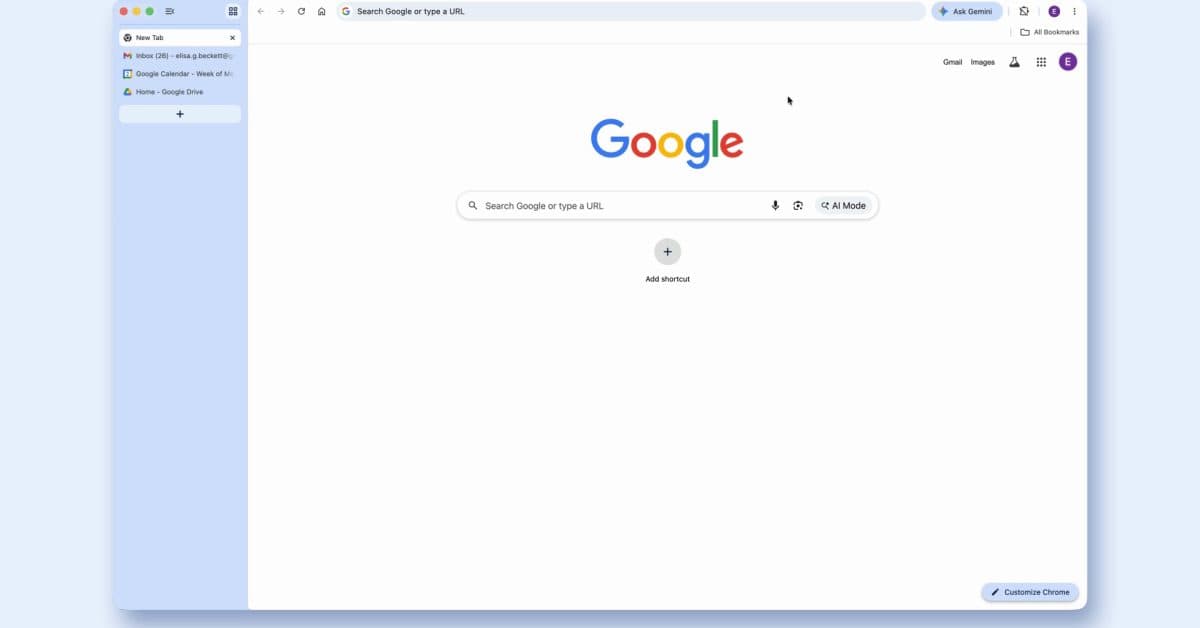
Vertical tabs shift your open tabs from a horizontal strip at the top of the browser to a sidebar on the left side. It’s like moving from a cramped shelf to a spacious bookcase. You can actually read what each tab says without squinting at a tiny favicon (the small icon that represents a website).
Microsoft Edge has featured vertical tabs since 2021, and Safari on Mac got them in 2022. With Chrome now adding this feature, it finally catches up with millions of users who’ve been asking for it.
How to Turn It On
Enabling vertical tabs in Chrome is simple. Just right-click anywhere on the existing tab strip at the top of any Chrome window and choose “Show Tabs Vertically” from the menu. Your tabs will instantly move to a collapsible sidebar on the left side of your screen. You can also collapse the sidebar to maximize your screen space while keeping the vertical layout active.
Google mentions that the rollout is gradual. If you don’t see the option right away, it should show up in the coming days as the update reaches your version of Chrome.
Reading Mode Gets an Upgrade Too
Alongside vertical tabs, Chrome is rolling out an enhanced Reading Mode. This mode removes ads, navigation menus, and other distractions from articles and web pages, leaving just the text and images. The new version features a cleaner layout and improved formatting support, making it more competitive with Safari’s Reader View and third-party extensions like Mercury Reader.
| By The Numbers: Vertical Tabs Across Browsers | |
|---|---|
| Year Microsoft Edge launched vertical tabs | 2021 |
| Year Safari launched vertical tabs | 2022 |
| Year Chrome is launching vertical tabs | 2026 |
| Chrome’s global desktop browser market share | ~65% |
| How to enable in Chrome | Right-click tab strip → “Show Tabs Vertically” |
Why Did This Take So Long?
Chrome’s tab strip structure is notoriously complex. Each tab runs in its own process, which helps stabilize the browser but also makes it a memory hog. Changing how tabs display without disrupting that underlying system required more engineering effort than it might seem.
Google has also been cautious about interface changes to Chrome, considering that over 65% of desktop web users depend on it daily. A flawed rollout could impact hundreds of millions of users.
What This Means for You
If you often have 20 or more tabs open — and data shows many people do — vertical tabs truly enhance your browsing experience. With horizontal tabs, they shrink down as you open more, eventually turning into just an icon without a readable title. Vertical tabs in a sidebar maintain a consistent width and display full page titles, allowing you to find what you need without clicking through each tab.
This setup is especially beneficial for users on wide-screen monitors or ultrawide displays. Most web content is designed for vertical reading, so sacrificing a bit of horizontal space for a better tab list is usually worth it.
The upgraded Reading Mode is also great for anyone who reads lengthy articles online and finds cluttered layouts or autoplaying videos distracting. It transforms a chaotic news page into a cleaner, more e-reader-like experience.
Community Reactions
“Been using Edge just for vertical tabs for three years. Might actually switch back to Chrome now.”
— u/tabbed_out_forever, Reddit r/chrome
“Only took them five years after Edge did it lol. Better late than never I guess. The reading mode update is actually slept on though.”
— YouTube comment on The Verge’s Chrome update video
What To Watch
- Full rollout completion: Google is gradually pushing the update, so expect all Chrome desktop users to see this feature in the next few weeks.
- Mobile version: Chrome on Android and iOS doesn’t yet support vertical tabs. No timeline has been shared for a mobile version.
- Customization options: Early users noted limited customization for the sidebar at launch. Google is likely to add width controls and display options in future updates.
- Competitor response: Firefox, which doesn’t have native vertical tabs (only available via extensions), may feel renewed pressure from users to add official support.
Sources

Maya Torres
Maya Torres is the Consumer Tech Editor at Explosion.com with 7 years covering product launches for major technology publications. She has reviewed over 300 devices across smartphones, laptops, wearables, and smart home products. Maya specializes in translating spec sheets into real-world buying advice and attends CES, MWC, and Apple keynotes as press. Her reviews focus on helping readers decide what to buy, not just what specs look good on paper.