Google Chrome is introducing two new desktop features: vertical tabs and an immersive reading mode. These updates let users customize their browsing experience in a way that fits their needs.
| By The Numbers: Alphabet / Google | |
|---|---|
| Ticker | GOOGL |
| Stock Price | $318.49 (+0.37%) |
| CEO | Sundar Pichai |
| Headquarters | Mountain View, CA |
| Founded | 1998 |
| Sector | Big Tech |
What’s Actually Changing
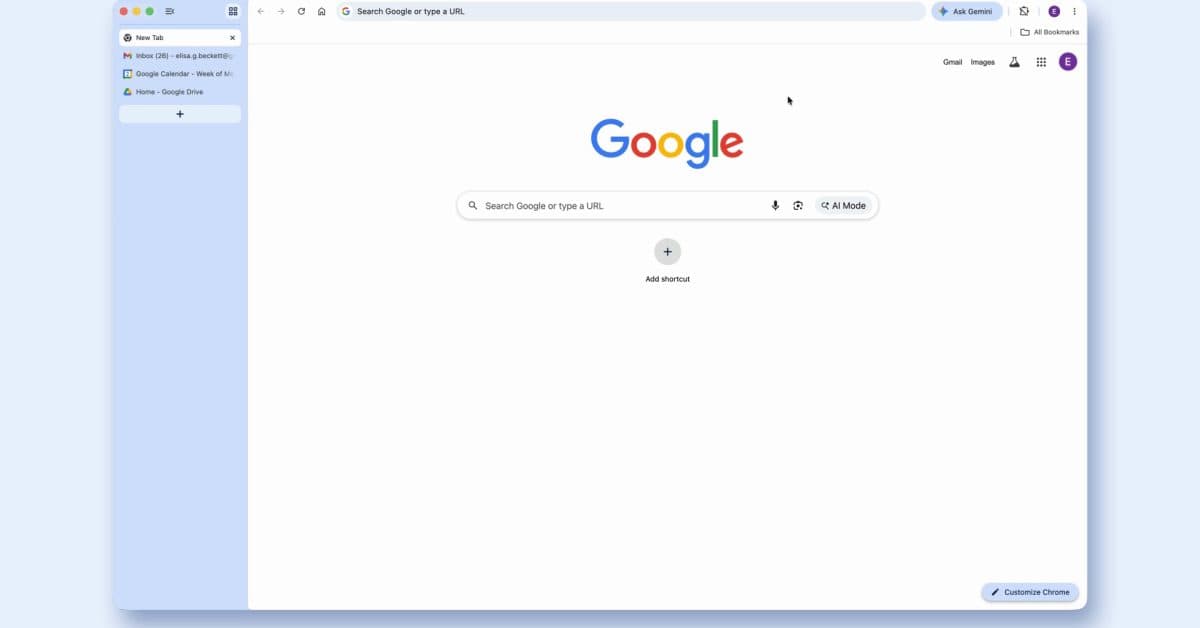
Currently, Chrome’s tab bar runs horizontally at the top of your browser window. With the new vertical tabs feature, tabs will shift to a sidebar on the left side of the screen. This might seem like a minor change, but if you often have 15 or 20 tabs open, it really helps. Vertical tabs display more of each tab’s title, making it a lot easier to find what you need without hovering over every single one.
The second new feature is an immersive reading mode. This mode transforms cluttered web pages into a clean, distraction-free view. It’s similar to what you get with Apple’s Safari Reader or Firefox’s Reader View. Chrome takes it a step further by offering a fullscreen option that removes ads, navigation menus, and sidebars, allowing just the article text and images to shine through.
How to Use These Features
Vertical Tabs
The vertical tab feature is rolling out to desktop users and can be activated via Chrome’s settings or by right-clicking the tab bar. Once it’s on, your tabs will move to a collapsible panel on the left side of the window. You can collapse it to a narrow icon strip when you need more screen space or expand it to see full tab titles.
Immersive Reading Mode
You’ll see a reading mode button in Chrome’s address bar when you’re on a compatible page, usually text-heavy articles and blog posts. Clicking it simplifies the page to its essential content. Google’s version adds a fullscreen option, pushing the clean reading view edge-to-edge to minimize distractions.
Why Chrome Is Playing Catch-Up
Both features are already available in competing browsers. Microsoft Edge introduced vertical tabs back in 2021, and many power users appreciate this feature for managing multiple tabs. Safari and Firefox have offered reading modes for years. Even though Chrome holds about 65% of the global desktop browser market, it has been slower to adopt interface customization compared to its competitors.
This shift from Google shows they’re aware of what keeps some users loyal to Edge or Firefox. While neither feature changes how Chrome operates behind the scenes, they tackle common issues that arise during daily use, as noted in CNET’s coverage of the announcement.
Community Reactions
“Finally. Edge has had vertical tabs for years and it’s literally the only reason some of my coworkers refused to switch back to Chrome. This removes that excuse.”
— Reddit user, r/chrome (via community discussion)
“The reading mode is nice but I wish they’d just fix tab memory usage instead of adding cosmetic stuff.”
— YouTube comment on 9to5Google’s coverage
The mixed reactions reflect what 9to5Google observed: users who value interface flexibility will likely enjoy these updates, while others believe Google’s focus could be better directed at performance improvements.
What This Means for You
If you’re a casual Chrome user with just a few tabs open, these updates probably won’t make much difference in your day. However, if you often keep dozens of tabs open for work and personal browsing, vertical tabs could save you time when searching for the right one. The immersive reading mode is also worth exploring if you read lengthy articles online and find yourself distracted by pop-ups or sticky headers.
Neither feature requires downloads or extensions. They’re built directly into Chrome, so you won’t experience any slowdowns from third-party add-ons. Previously, users had to rely on extensions like Vertical Tabs or Mercury Reader, which can come with their own performance and privacy trade-offs.
In short, Chrome is becoming more customizable without asking anything extra from you.
What To Watch
- Rollout timing: Google has started rolling out these features to desktop users. However, broad availability usually takes a few weeks to reach everyone on the stable channel (the standard, non-beta version of Chrome).
- Mobile expansion: Neither feature has been confirmed for Chrome on iOS or Android yet. Since Safari on iPhone already offers a reading mode, there will likely be pressure on Google to add at least the reading view to mobile Chrome.
- Edge response: Microsoft may enhance its vertical tabs to set Edge apart further, especially now that Chrome has introduced a similar option.
- Performance updates: Google is also working on reducing Chrome’s memory usage separately. Keep an eye out for announcements related to Google I/O, typically held in May, where broader improvements to Chrome are often revealed.

Ava Mitchell
Ava Mitchell is a digital culture journalist at Explosion.com covering social media platforms, streaming services, and the creator economy. With 4 years reporting on TikTok, Instagram, YouTube, and the apps that shape daily life, Ava specializes in explaining platform policy changes and their impact on everyday users. She previously managed social media strategy for a tech startup, giving her firsthand experience with the platforms she now covers.