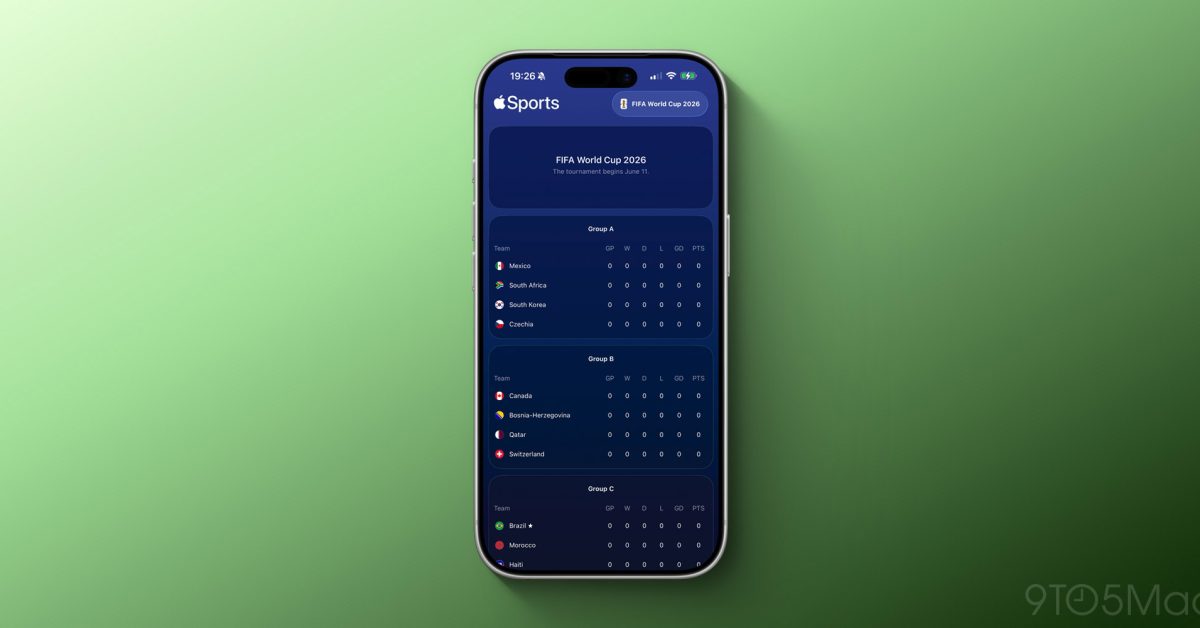
Apple has updated its free Apple Sports app to fully support the 2026 FIFA World Cup. Now, iPhone users can track national teams, view tournament groupings, and follow scores leading up to the tournament’s kickoff on June 11.
What’s New in the App
This update introduces two key features: complete tournament group listings and the option to follow specific national teams. If you’ve used Apple Sports for tracking an NFL or NBA team, you’ll find this works the same way. Just tap your team, and you’ll see scores, schedules, and standings right in the app.
This World Cup will also feature 48 teams, an increase from the traditional 32-team format that’s been in place since 1998. That means a 50% expansion, leading to more countries, more groups, and more matches to keep track of. With this update, Apple’s app is ready for the added complexity, already showcasing the full bracket structure for browsing.
A Bigger Tournament, A Bigger Stage
The 2026 World Cup stands out for more than just the increased team count. It’s co-hosted by the United States, Canada, and Mexico, marking the first time a World Cup spans three countries. The opening match kicks off on June 11 at MetLife Stadium in East Rutherford, New Jersey.
Games will take place in 16 host cities across three time zones. That can make tracking your team’s schedule pretty tricky. This is where a sports app really shines, and Apple is rolling out its update over two months before the first game starts.
| Data Point | Detail |
|---|---|
| Ticker | AAPL ($255.92, +0.11%) |
| CEO | Tim Cook |
| Headquarters | Cupertino, CA |
| Founded | 1976 |
| World Cup Teams Supported | 48 (up from 32 in previous tournaments) |
| Tournament Start Date | June 11, 2026 — MetLife Stadium, NJ |
How Apple Sports Works
Apple Sports is a free app exclusive to iPhone users, launched in early 2024. Think of it as a streamlined scores app—no social feeds or cluttered news sections. You get schedules, live scores, and standings. The app currently covers major American sports leagues like the NFL, NBA, MLB, and NHL, plus soccer leagues like MLS and various European competitions.
With the World Cup added, it now includes one of the biggest sporting events in the world. Unlike ESPN or Google Sports, Apple Sports loads scores almost instantly, which is crucial when you’re checking a live match.
What This Means for Everyday Users
If you’re an iPhone user planning to follow the World Cup this summer, this update offers a simple, free way to track your favorite national team. You won’t need to download another app or sift through a busy sports website.
The group stage can be confusing for casual fans as teams are sorted into pools before the knockout rounds. With everything neatly laid out in an app you already have, it makes diving into the tournament easier—even if you’re new to following soccer.
The app is free and doesn’t require a subscription, setting it apart from premium sports tracking options. However, it’s only available on iPhone, so Android users will have to look for alternatives.
Community Reaction
“Finally, Apple Sports is getting some global love. The MLS support was fine, but the World Cup is a whole different scale.”
“It’s a good app for scores, but I wish it had more customizable push notifications. Still better than loading up ESPN every time.”
Sources
- Apple Sports adds support for the 2026 FIFA World Cup — 9to5Mac
- Apple Sports Now Lets You Follow Your Favorite 2026 FIFA World Cup Teams — MacRumors
What To Watch
- June 11, 2026: The 2026 FIFA World Cup kicks off at MetLife Stadium in New Jersey. This is when Apple Sports’ new features will really be put to the test with live match data.
- Before the tournament: Keep an eye out for Apple possibly adding live match notifications or enhanced bracket tracking as the draw finalizes and the schedule gets locked in.
- Android gap: Apple Sports is still iPhone-only. If the app gains popularity during the World Cup, Apple may feel pressure to release it for other platforms, though there’s been no indication of that yet.