



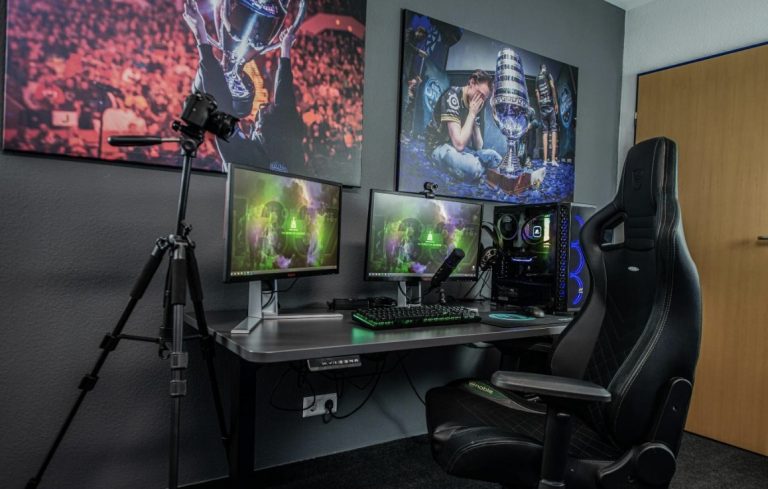


<p>College dorm rooms are usually small; you only get space for sleeping and studying. Sometimes you may have to share the room, and this means you need to be careful to avoid hogging space. If you are a gaming enthusiast, it could be challenging to set up fancy gaming equipment. But you can still enhance your gaming experience even in a small dorm room when you set up the space smartly. Here is how to do it.</p>
<!-- WP QUADS Content Ad Plugin v. 3.0.1 -->
<div class="quads-location quads-ad135805 " id="quads-ad135805" style="float:none;text-align:center;padding:0px 0 0px 0;" data-lazydelay="3000">

</div>

<h2>Prioritize Safety</h2>
<p>When living with a roomie, you should ensure that your safety and their safety are observed. Put your gaming PC away from your clothing. If your PC sparks fire accidentally, you might create a difficult situation for yourself and your roommate. Additionally, ensure that you do not place your PC on the carpet. Find something to elevate it from the ground to reduce the likelihood of static electricity forming. It will also minimize dust from forming around the computer.</p>
<h2>Choose a Gaming Chair of Good Size</h2>
<p>If you are a serious gamer, you will spend a significant amount of time on your gaming chair. Keep in mind that your room is small, so you should be mindful of the size. Do not choose a chair that is too large and occupies a lot of space. It will limit the things to add to the room.</p>
<p>Also, the chair should be comfortable. Your gaming chair will double up as your study chair, and if it is uncomfortable, you’ll get fatigued easily sitting on it, and your study sessions will not be productive. You’ll even be unmotivated to do your assignments, and you will frequently be thinking, “I should <a href="https://payforessay.net/">pay for essay</a> to get this assignment done.”</p>
<!-- WP QUADS Content Ad Plugin v. 3.0.1 -->
<div class="quads-location quads-ad135804 " id="quads-ad135804" style="float:none;text-align:center;padding:0px 0 0px 0;" data-lazydelay="3000">

</div>

<h2>Find the Right Desk</h2>
<p>Some dorm rooms have built-in closets and desks, but others allow you to buy your own furniture. If your dorm room doesn’t have a desk, you’ll have the advantage of customizing the room based on your preferences. Put a corner L desk in the corner. The desk can act as your study area and gaming station, allowing you to have a versatile space for your setup.</p>
<h2>Organize Your Cables</h2>
<p>There are many components of a gaming setup that make it easy for cables to get tangled and make the room messy. Use clips, ties, and organizers to reduce the likelihood of cables being tangled up. They will help ensure that your cables are well organized. Another option to consider is using wireless gadgets. Wireless devices make it possible to switch from one mode to the next without spending a lot of time reorganizing your station.</p>
<h2>Ensure the Lighting Is Right</h2>
<p>Adequate lighting, together with dark curtains, will assist you in creating a dark mode for your gaming experience. Also, modify your lighting in a way that you can switch between work atmosphere and gaming. An excellent modification is using smart bulbs that can be easily adjusted using your smartphone to various colors based on your preference. Remember, you’ll be using your room to study, and proper lighting will be essential in boosting your concentration. If the room is poorly lit, you’ll struggle to study or do assignments, and you might end up delegating your papers to writing services like those discussed at <a href="https://www.clevescene.com/sponsored/the-best-essay-writing-service-2022-independent-review-39279903">https://www.clevescene.com/sponsored/the-best-essay-writing-service-2022-independent-review-39279903</a>.</p>
<h2>Get a Good Monitor</h2>
<p>In many cases, people use their gaming setup for work and studies. With this consideration, ensure that you have a monitor or a TV that has enough input to meet all your needs. If you are gaming using an Xbox One S, you need a television supporting the 4K resolution. When purchasing the TV, ensure it has all the inputs that you require for all your tasks to reduce the need for more than one monitor, which will end up taking up a lot of your space.</p>
<!-- WP QUADS Content Ad Plugin v. 3.0.1 -->
<div class="quads-location quads-ad135804 " id="quads-ad135804" style="float:none;text-align:center;padding:0px 0 0px 0;" data-lazydelay="3000">

</div>

<h2>Forget the Bulky Sound System</h2>
<p><img class="alignnone size-large wp-image-149631" src="https://www.explosion.com/wp-content/uploads/2024/07/Screenshot-2024-07-11-at-14.14.48-1024x661.jpg" alt="" width="1024" height="661" /></p>
<p>A nice sound system enhances the gaming experience and is a worthy addition to your gaming setup. However, if you have a limited or a roomie, you might consider other options such as headsets. Quality headsets will still give you an awesome gaming experience. Besides, they will not be a distraction to your roomie. A quality headset is also important in helping you talk to your peers, especially in multiplayer game options, and you do not need to worry about angering your neighbors.</p>
<h2>Utilize Vertical Space</h2>
<p>Your gaming area might take up a lot of space in your room, and you might even think about doing away with other gaming equipment. Utilizing your vertical space is a good strategy to use your space efficiently. Take advantage of wall-mounted shelves. You can use them to store your consoles and PC, which will help save a lot of space. You can also use vertical shelves for your clothing and other things to create more space for your gaming equipment.</p>
<h2>Get Connected</h2>
<p>An internet connection is a prerequisite for a complete gaming setup. Ever experienced lagging or sluggish internet when gaming? It’s usually frustrating, and the experience can kill the enjoyment of even the greatest games. Thus, making sure you have a strong connection will help you enjoy gaming even in a small dorm room.</p>
<!-- WP QUADS Content Ad Plugin v. 3.0.1 -->
<div class="quads-location quads-ad135804 " id="quads-ad135804" style="float:none;text-align:center;padding:0px 0 0px 0;" data-lazydelay="3000">

</div>

<h2>Shutdown</h2>
<p>Gaming is usually a hobby for many people, but setting up a gaming space can be challenging if you only have a small dorm room. If you find yourself in this situation, you do not need to worry because there are many strategies that you can use to effectively utilize the small space you have. The first thing to consider is your safety and those around you. Ensure your consoles are set up in a way that they do not pose a risk of fire. Then, consider the size and shape of your furniture; use the ones that don’t take up a large space. Also, use wireless gadgets to make the room look neat. What’s more, opt for a headset instead of a bulky sound system. Lastly, utilize vertical space in your room.</p>

<div class="essb_links essb_counter_modern_right essb_displayed_bottom essb_share essb_template_default4-retina essb_539404785 print-no" id="essb_displayed_bottom_539404785" data-essb-postid="149629" data-essb-position="bottom" data-essb-button-style="button" data-essb-template="default4-retina" data-essb-counter-pos="right" data-essb-url="https://www.explosion.com/149629/tips-for-setting-up-gaming-space-in-a-small-dorm-room/" data-essb-fullurl="https://www.explosion.com/149629/tips-for-setting-up-gaming-space-in-a-small-dorm-room/" data-essb-instance="539404785"><ul class="essb_links_list"><li class="essb_item essb_link_facebook nolightbox essb_link_svg_icon"> <a href="https://www.facebook.com/sharer/sharer.php?u=https%3A%2F%2Fwww.explosion.com%2F149629%2Ftips-for-setting-up-gaming-space-in-a-small-dorm-room%2F&t=Tips+for+Setting+up+Gaming+Space+in+a+Small+Dorm+Room" title="Share on Share" onclick="essb.window(&#39;https://www.facebook.com/sharer/sharer.php?u=https%3A%2F%2Fwww.explosion.com%2F149629%2Ftips-for-setting-up-gaming-space-in-a-small-dorm-room%2F&t=Tips+for+Setting+up+Gaming+Space+in+a+Small+Dorm+Room&#39;,&#39;facebook&#39;,&#39;539404785&#39;); return false;" target="_blank" rel="nofollow" class="nolightbox essb-s-bg-facebook essb-s-c-light essb-s-ch-light essb-s-bgh-dark essb-s-bg-network" ><span class="essb_icon essb_icon_facebook"><svg class="essb-svg-icon essb-svg-icon-facebook" aria-hidden="true" role="img" focusable="false" xmlns="http://www.w3.org/2000/svg" width="16" height="16" viewBox="0 0 16 16"><path d="M16 8.049c0-4.446-3.582-8.05-8-8.05C3.58 0-.002 3.603-.002 8.05c0 4.017 2.926 7.347 6.75 7.951v-5.625h-2.03V8.05H6.75V6.275c0-2.017 1.195-3.131 3.022-3.131.876 0 1.791.157 1.791.157v1.98h-1.009c-.993 0-1.303.621-1.303 1.258v1.51h2.218l-.354 2.326H9.25V16c3.824-.604 6.75-3.934 6.75-7.951"></path></svg></span><span class="essb_network_name">Share</span></a></li><li class="essb_item essb_link_twitter nolightbox essb_link_twitter_x essb_link_svg_icon"> <a href="https://x.com/intent/post?text=Tips%20for%20Setting%20up%20Gaming%20Space%20in%20a%20Small%20Dorm%20Room&;url=https%3A%2F%2Fwww.explosion.com%2F149629%2Ftips-for-setting-up-gaming-space-in-a-small-dorm-room%2F" title="Share on Tweet" onclick="essb.window(&#39;https://x.com/intent/post?text=Tips%20for%20Setting%20up%20Gaming%20Space%20in%20a%20Small%20Dorm%20Room&;url=https%3A%2F%2Fwww.explosion.com%2F149629%2Ftips-for-setting-up-gaming-space-in-a-small-dorm-room%2F&#39;,&#39;twitter&#39;,&#39;539404785&#39;); return false;" target="_blank" rel="nofollow" class="nolightbox essb-s-bg-twitter essb-s-c-light essb-s-ch-light essb-s-bgh-dark essb-s-bg-network" ><span class="essb_icon essb_icon_twitter_x"><svg class="essb-svg-icon essb-svg-icon-twitter_x" aria-hidden="true" role="img" focusable="false" viewBox="0 0 24 24"><path d="M18.244 2.25h3.308l-7.227 8.26 8.502 11.24H16.17l-5.214-6.817L4.99 21.75H1.68l7.73-8.835L1.254 2.25H8.08l4.713 6.231zm-1.161 17.52h1.833L7.084 4.126H5.117z"></path></svg></span><span class="essb_network_name">Tweet</span></a></li><li class="essb_item essb_link_pinterest nolightbox essb_link_svg_icon"> <a href="#" title="Share on Pin It" onclick="essb.pinterest_picker(&#39;539404785&#39;); return false;" target="_blank" rel="nofollow" class="nolightbox essb-s-bg-pinterest essb-s-c-light essb-s-ch-light essb-s-bgh-dark essb-s-bg-network" ><span class="essb_icon essb_icon_pinterest"><svg class="essb-svg-icon essb-svg-icon-pinterest" aria-hidden="true" role="img" focusable="false" width="32" height="32" viewBox="0 0 32 32" xmlns="http://www.w3.org/2000/svg"><path d="M10.625 12.25c0-1.375 0.313-2.5 1.063-3.438 0.688-0.938 1.563-1.438 2.563-1.438 0.813 0 1.438 0.25 1.875 0.813s0.688 1.25 0.688 2.063c0 0.5-0.125 1.125-0.313 1.813-0.188 0.75-0.375 1.625-0.688 2.563-0.313 1-0.563 1.75-0.688 2.313-0.25 1-0.063 1.875 0.563 2.625 0.625 0.688 1.438 1.063 2.438 1.063 1.75 0 3.188-1 4.313-2.938 1.125-2 1.688-4.375 1.688-7.188 0-2.125-0.688-3.875-2.063-5.25-1.375-1.313-3.313-2-5.813-2-2.813 0-5.063 0.875-6.75 2.688-1.75 1.75-2.625 3.875-2.625 6.375 0 1.5 0.438 2.75 1.25 3.75 0.313 0.313 0.375 0.688 0.313 1.063-0.125 0.313-0.25 0.813-0.375 1.5-0.063 0.25-0.188 0.438-0.375 0.5s-0.375 0.063-0.563 0c-1.313-0.563-2.25-1.438-2.938-2.75s-1-2.813-1-4.5c0-1.125 0.188-2.188 0.563-3.313s0.875-2.188 1.625-3.188c0.75-1.063 1.688-1.938 2.688-2.75 1.063-0.813 2.313-1.438 3.875-1.938 1.5-0.438 3.125-0.688 4.813-0.688 1.813 0 3.438 0.313 4.938 0.938 1.5 0.563 2.813 1.375 3.813 2.375 1.063 1.063 1.813 2.188 2.438 3.5 0.563 1.313 0.875 2.688 0.875 4.063 0 3.75-0.938 6.875-2.875 9.313-1.938 2.5-4.375 3.688-7.375 3.688-1 0-1.938-0.188-2.813-0.688-0.875-0.438-1.5-1-1.875-1.688-0.688 2.938-1.125 4.688-1.313 5.25-0.375 1.438-1.25 3.188-2.688 5.25h-1.313c-0.25-2.563-0.188-4.688 0.188-6.375l2.438-10.313c-0.375-0.813-0.563-1.813-0.563-3.063z"></path></svg></span><span class="essb_network_name">Pin It</span></a></li><li class="essb_item essb_link_mail nolightbox essb_link_svg_icon"> <a href="#" title="Share on Email" onclick="essb_open_mailform(&#39;539404785&#39;); return false;" target="_blank" rel="nofollow" class="nolightbox essb-s-bg-mail essb-s-c-light essb-s-ch-light essb-s-bgh-dark essb-s-bg-network" ><span class="essb_icon essb_icon_mail"><svg class="essb-svg-icon essb-svg-icon-mail" aria-hidden="true" role="img" focusable="false" width="32" height="32" xmlns="http://www.w3.org/2000/svg" viewBox="0 0 60 60"><polygon points="60,50.234 60,9.944 39.482,30.536 " /><polygon points="0,9.941 0,50.234 20.519,30.535 " /><path d="M1.387,8.5l21.002,21.08c0.121,0.051,0.471,0.415,0.517,0.519l5.941,5.963c0.635,0.591,1.672,0.59,2.333-0.025l5.911-5.933c0.046-0.105,0.4-0.473,0.522-0.524L58.615,8.5H1.387z" /><path d="M38.07,31.954l-5.5,5.52c-0.73,0.68-1.657,1.019-2.58,1.019c-0.914,0-1.823-0.332-2.533-0.993l-5.526-5.546L1.569,51.5h56.862L38.07,31.954z" /></svg></span><span class="essb_network_name">Email</span></a></li></ul></div>



0 Comments