





<div>
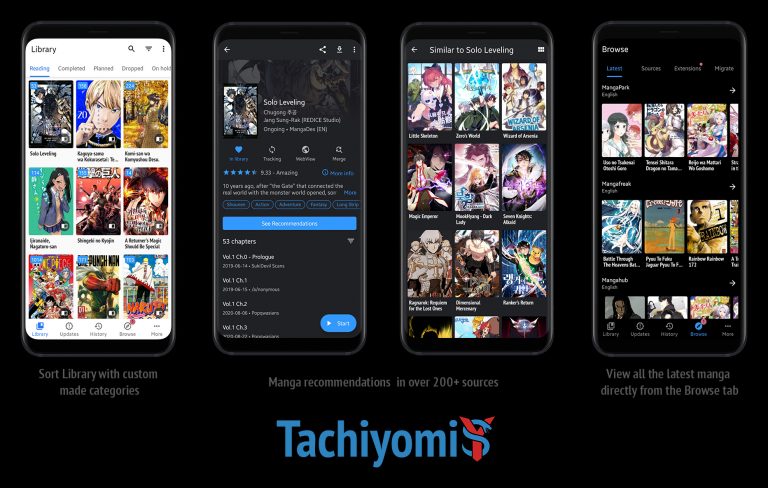
<p>Tachiyomi, a popular manga reader app for Android devices, offers users access to a wide range of manga sources through its extensions. Users sometimes report that the app can be slow to load pages or download content, which can lead to a less than ideal reading experience. A number of factors can contribute to the sluggish performance of Tachiyomi, including the user&#8217;s internet connection, the app&#8217;s method of fetching content, and the source websites&#8217; response to traffic.</p>
<!-- WP QUADS Content Ad Plugin v. 2.0.99 -->
<div class="quads-location quads-ad135805 " id="quads-ad135805" style="float:none;text-align:center;padding:0px 0 0px 0;" data-lazydelay="3000">

</div>

<p><img src="https://www.explosion.com/wp-content/uploads/2023/12/v2-4h9fa-85xhw.jpg" alt="" /></p>
<p>Certain technical aspects intrinsic to Tachiyomi and the user&#8217;s device settings can impact the app&#8217;s speed. For instance, the app relies on internet access to fetch content from various sources, and any restrictions by the user&#8217;s Internet Service Provider (ISP) or a weak internet connection can slow down content retrieval. Additionally, Tachiyomi&#8217;s tendency to download content one page at a time could be a deliberate design choice to prevent IP bans that some source sites might enforce if they detect too many simultaneous requests. This protective measure helps maintain access to content but can result in slower loading times.</p>
<p>Moreover, device-specific configurations can also influence Tachiyomi&#8217;s performance. The app&#8217;s reliance on Android&#8217;s WebView system for rendering web pages means that using non-standard or outdated WebView components can potentially cause the app to function suboptimally. Ensuring that the device operates on the latest version of the Android System WebView or Google Chrome can be critical for maintaining performance standards. Users are encouraged to troubleshoot issues by altering network settings, such as enabling DNS over HTTPS, switching between Wi-Fi and mobile data, or using a VPN, which may alleviate some of the loading issues encountered in Tachiyomi.</p>
<!-- WP QUADS Content Ad Plugin v. 2.0.99 -->
<div class="quads-location quads-ad135804 " id="quads-ad135804" style="float:none;text-align:center;padding:0px 0 0px 0;" data-lazydelay="3000">

</div>

<p>So, why is Tachiyomi so slow? Let&#8217;s take a look at possible options.</p>
</div>
<div>
<h2>Common Issues Affecting Performance</h2>
<div></div>
<p>Tachiyomi users often experience slow performance due to a range of issues, from the app&#8217;s setup to external factors such as network connectivity. Identifying these problems is essential for a smoother reading experience with manga sources.</p>
<h3>App Not Installed Properly</h3>
<p>Improper installation of Tachiyomi can lead to persistent performance hiccups. Users should ensure that they have followed the correct installation process for the app. A reinstallation might resolve unexpected lag or crashes encountered during use.</p>
<h3>Outdated App Version</h3>
<p><strong>Tachiyomi</strong> periodically releases <strong>updates</strong> that enhance performance and add new features. Running an <strong>outdated version</strong> of the app can contribute to slower loading times. Users should check for the latest updates and install them to maintain optimal app performance.</p>
<!-- WP QUADS Content Ad Plugin v. 2.0.99 -->
<div class="quads-location quads-ad135804 " id="quads-ad135804" style="float:none;text-align:center;padding:0px 0 0px 0;" data-lazydelay="3000">

</div>

<h3>Problems with Extensions</h3>
<p>The app&#8217;s functionality relies heavily on its <strong>extensions</strong> that connect to various manga sources. Issues arise when these are incompatible or outdated. Users should ensure their extensions are updated and consider reviewing the extension settings or GitHub discussions if performance issues persist.</p>
<h3>Network Connectivity Challenges</h3>
<p>Loading performance can be significantly impacted by the user&#8217;s <strong>network connectivity</strong>. A weak or unstable connection can result in slow loading times for <strong>mangas</strong>. Users might resolve this by switching networks, using mobile data instead of Wi-Fi, or employing a VPN if the <strong>site</strong> is being blocked by their Internet Service Provider.</p>
<h3>Server-Side Limitations</h3>
<p>Some manga sources may impose limitations to deter rapid consecutive requests from apps like Tachiyomi, leading to slower loading times. High <strong>Cloudflare</strong> protection on certain websites can also hinder the app&#8217;s access to content. Users may have limited options in fixing such server-side issues but can try accessing the content at different times or using alternative sources.</p>
</div>
<div>
<h2>Optimization Strategies</h2>
<p>To enhance the performance of Tachiyomi, users can implement several optimization strategies. These tactics are designed to streamline the app&#8217;s functionality and address common slowdowns.</p>
<!-- WP QUADS Content Ad Plugin v. 2.0.99 -->
<div class="quads-location quads-ad135804 " id="quads-ad135804" style="float:none;text-align:center;padding:0px 0 0px 0;" data-lazydelay="3000">

</div>

<h3>Clearing Cache and Cookies</h3>
<p>Regularly clearing the cache and cookies from Tachiyomi can lead to improved loading times. Users can do this by going into the app settings and selecting the option to clear cache. This removes temporary data that may be slowing down the app.</p>
<h3>Updating Extensions and Sources</h3>
<p>Update extensions and sources regularly for a smoother experience. This ensures compatibility and can resolve lag-related issues. Users should navigate to the <strong>Extensions</strong> section within Tachiyomi and hit the <strong>Update</strong> button beside each extension.</p>
<h3>Switching to High-Quality Sources</h3>
<p>Switching to high-quality sources such as <strong>MangaSee</strong> can improve loading speeds. High-quality sources are more likely to have optimized servers and better content delivery networks, which can reduce loading times.</p>
<h3>Troubleshooting Network Issues</h3>
<p>To troubleshoot network problems that might be causing slowdowns, users can:</p>
<!-- WP QUADS Content Ad Plugin v. 2.0.99 -->
<div class="quads-location quads-ad135804 " id="quads-ad135804" style="float:none;text-align:center;padding:0px 0 0px 0;" data-lazydelay="3000">

</div>

<ul>
<li>Enable <strong>DNS over HTTPS</strong> under the app’s advanced settings</li>
<li>Try different networks (Wi-Fi, mobile data, VPN) to determine if the issue is network-specific</li>
<li><strong>Reboot the router</strong> or modem to resolve temporary connectivity issues</li>
</ul>
<p>Adhering to these optimization strategies should help in reducing slow loading times and enhancing the overall user experience with Tachiyomi.</p>
</div>
<div>
<h2>Technical Solutions and Workarounds</h2>
<div></div>
<p>To enhance the performance of Tachiyomi, several technical solutions and workarounds can be implemented. These adjustments target different aspects of the app to optimize reading and downloading manga.</p>
<h3>Using External SD Card for Downloads</h3>
<p>Users can alleviate internal storage constraints by configuring Tachiyomi to download manga to an <strong>external SD card</strong>. This can speed up the app as it prevents the primary storage from being overburdened, which can slow down the app&#8217;s performance. Users should ensure the SD card has <strong>high-write speeds</strong> and ample space for the best results.</p>
<h3>Reinstalling Tachiyomi APK</h3>
<p>If users encounter persistent issues, they might consider <strong>reinstalling the Tachiyomi APK</strong>. A fresh installation can fix problems arising from corrupted files or incomplete updates. When reinstalling, users should download the latest version from <strong>verified sources or GitHub</strong> to ensure they have the most updated and secure app installed.</p>
<!-- WP QUADS Content Ad Plugin v. 2.0.99 -->
<div class="quads-location quads-ad135804 " id="quads-ad135804" style="float:none;text-align:center;padding:0px 0 0px 0;" data-lazydelay="3000">

</div>

<h3>Adjusting Reader Settings</h3>
<p>Adjusting reader settings can substantially improve the manga reading experience in Tachiyomi. Users should consider the following adjustments:</p>
<ul>
<li>Lower the <strong>image quality</strong> if loading times are slow, especially for users with weaker internet connections</li>
<li>Disable <strong>image prefetching</strong> as this can consume more resources and can contribute to slower performance</li>
<li>Use the default <strong>Image Decoder</strong> settings recommended by the maintainers for optimal performance</li>
</ul>
<h3>Community Support and Resources</h3>
<p>When encountering issues, the Tachiyomi community can be an invaluable resource. Users should join the community on platforms like <strong>Discord</strong> or check the <strong>GitHub</strong> repository for status updates, fixes, or workarounds posted by other users or maintainers. The community might also provide updated <strong>extensions</strong> or suggestions for better sources for manga downloads.</p>
</div>
<div>
<h2>Advanced Troubleshooting</h2>
<p>Advanced troubleshooting steps for Tachiyomi involve a closer examination of the app&#8217;s technical aspects to diagnose speed-related issues. Understanding crash logs and staying updated with the latest developments on GitHub can provide significant insight.</p>
<h3>Analyzing Crash Logs</h3>
<p>When Tachiyomi experiences frequent slowdowns or crashes, analyzing crash logs can pinpoint the underlying problems. Users should first ensure they are familiar with navigating to the location where crash logs are stored on their device. They can look for <code>java.security.cert.CertPathValidatorException</code> or <code>Chain validation failed</code> errors, which indicate issues with the app&#8217;s security certificates, and take these specifics to the app maintainers or support forums for further assistance.</p>
<!-- WP QUADS Content Ad Plugin v. 2.0.99 -->
<div class="quads-location quads-ad135804 " id="quads-ad135804" style="float:none;text-align:center;padding:0px 0 0px 0;" data-lazydelay="3000">

</div>

<ul>
<li><strong>Where to find crash logs:</strong>
<ul>
<li>Depending on the device and the version of the operating system, crash logs can typically be found within the app&#8217;s settings under a &#8216;Troubleshooting&#8217; section or by using a file manager to navigate to the app&#8217;s designated logs directory</li>
</ul>
</li>
<li><strong>Interpreting crash logs:</strong>
<ul>
<li>Look for timestamps paired with error messages or exception details</li>
<li>Identify recurring patterns or specific actions that trigger slowdowns or crashes</li>
</ul>
</li>
</ul>
<h3>Exploring GitHub for Updates</h3>
<p>GitHub hosts the Tachiyomi project&#8217;s repository and serves as a hub for updates, bug reports, and communication between users and developers. Ensure that the Tachiyomi app and all of its extensions are up to date. Users may find that their issues have already been addressed in recent updates. They should monitor the repository for:</p>
<ul>
<li><strong>Latest Releases:</strong>
<ul>
<li>Check the &#8216;Releases&#8217; section for the most recent version of the app to ensure optimal performance and compatibility with different manga sources</li>
</ul>
</li>
<li><strong>Open and Closed Issues:</strong>
<ul>
<li>Examine the &#8216;Issues&#8217; tab for similar reports from other users, which may include temporary fixes or updates on the progress towards a permanent solution</li>
<li>Participation in discussions may provide additional context or workarounds that the community has identified</li>
</ul>
</li>
<li><strong>Contributions from maintainers and the community:</strong>
<ul>
<li>Review contributions to see if slowdowns might be due to a known bug that is being addressed</li>
<li>Engage with the community and maintainers in a collaborative manner to address and troubleshoot issues</li>
</ul>
</li>
</ul>
<p>By taking these advanced troubleshooting steps, users are more likely to discover the specific reasons behind Tachiyomi&#8217;s slow performance and can contribute toward finding solutions.</p>
</div>
<div>
<h2>User Account Management</h2>
<p><img src="https://www.explosion.com/wp-content/uploads/2023/12/v2-4h9ir-ervg9.jpg" alt="" /></p>
<p>When using Tachiyomi, efficient user account management is crucial for maintaining a smooth experience. This entails understanding the intricacies of sign-in protocols and registration processes which can directly impact app performance.</p>
<!-- WP QUADS Content Ad Plugin v. 2.0.99 -->
<div class="quads-location quads-ad135804 " id="quads-ad135804" style="float:none;text-align:center;padding:0px 0 0px 0;" data-lazydelay="3000">

</div>

<h3>Sign-In Issues</h3>
<p>Sign-in issues are often a bottleneck leading to Tachiyomi&#8217;s slow performance. Users should ensure that their <strong>email address</strong> and <strong>password</strong> are entered correctly during the sign-in process. If a user repeatedly fails to sign in, the app may slow down or restrict access temporarily. In case users have forgotten their credentials, they should utilize the &#8216;Forgot Password&#8217; function which typically sends an <strong>account related email</strong> to their registered email address. Adherence to the app&#8217;s <strong>terms of service</strong> is also mandatory to avoid access issues.</p>
<h3>Account Registration Procedure</h3>
<p>To register for a new account with Tachiyomi, users should follow a precise procedure. Initially, they must provide a valid <strong>email address</strong> and create a <strong>username</strong> and <strong>password</strong>. These details are critical as they will be needed every time the user signs in to the app. Upon submission, the user receives an <strong>account related email</strong> to confirm their <strong>email address</strong>. This verification is a standard practice to enhance security. Users are also advised to carefully review the <strong>privacy statement</strong> and <strong>terms of service</strong> during the sign-up process to ensure they are informed about their data usage and app&#8217;s policies.</p>
</div>
<div>
<h2>Understanding Tachiyomi&#8217;s Project and Community</h2>
<p>The Tachiyomi project, hosted on GitHub, is the collaborative effort of a global community of developers and contributors. Maintainers ensure the app&#8217;s steady development and interaction with the community through posts and updates.</p>
<p><img src="https://www.explosion.com/wp-content/uploads/2023/12/v2-4h9jd-2g74l.jpg" alt="" /></p>
<!-- WP QUADS Content Ad Plugin v. 2.0.99 -->
<div class="quads-location quads-ad135804 " id="quads-ad135804" style="float:none;text-align:center;padding:0px 0 0px 0;" data-lazydelay="3000">

</div>

<h3>Exploring the Tachiyomi Project</h3>
<p>The Tachiyomi project is an open-source manga reader application for Android, which is available on GitHub. <strong>Open-source</strong> projects like this depend heavily on the contributions from voluntary developers and the wider community. These projects often evolve through collaborative efforts where coding, bug fixing, and feature enhancements are carried out by contributors of various levels of expertise.</p>
<p><strong>Key Aspects of the Project:</strong></p>
<ul>
<li><strong>Host Platform:</strong> GitHub</li>
<li><strong>Accessibility:</strong> Free and open-source</li>
<li><strong>Maintainers:</strong> They play a crucial role in managing pull requests and issues submitted by community members</li>
</ul>
<p>It relies on a decentralized model of maintenance, where individual maintainers may come from different backgrounds but unite with a common purpose: to enhance the Tachiyomi app. The maintainers typically use their GitHub accounts to manage contributions, review code, and post updates regarding the project’s progress.</p>
<h3>Contributing to the Community</h3>
<p>Contributors can actively engage with the Tachiyomi community in various ways, not limited to code development. They can:</p>
<!-- WP QUADS Content Ad Plugin v. 2.0.99 -->
<div class="quads-location quads-ad135804 " id="quads-ad135804" style="float:none;text-align:center;padding:0px 0 0px 0;" data-lazydelay="3000">

</div>

<ul>
<li><strong>Report issues</strong> to help improve the app’s performance</li>
<li><strong>Suggest features</strong>, enhancing user experience</li>
<li>Assist in <strong>troubleshooting problems</strong> faced by other users</li>
</ul>
<p>The project’s nature prompts individuals to create a GitHub account, through which they can post suggestions, issues, and code contributions. Active engagement fosters a strong sense of community, ensuring that the project remains robust and user-centered. Through consistent collaboration, the Tachiyomi community thrives, keeping the app reliable and at pace with its user’s needs.</p>
<p>In this digital age, the intersection of dedicated maintainers and a vibrant community accelerates project development and leads to the creation of a versatile, user-friendly reading experience.</p>
</div>
</p>
<div class="essb_links essb_counter_modern_right essb_displayed_bottom essb_share essb_template_default4-retina essb_198128802 print-no" id="essb_displayed_bottom_198128802" data-essb-postid="146272" data-essb-position="bottom" data-essb-button-style="button" data-essb-template="default4-retina" data-essb-counter-pos="right" data-essb-url="https://www.explosion.com/146272/why-is-tachiyomi-so-slow/" data-essb-fullurl="https://www.explosion.com/146272/why-is-tachiyomi-so-slow/" data-essb-instance="198128802"><ul class="essb_links_list"><li class="essb_item essb_link_facebook nolightbox essb_link_svg_icon"> <a href="https://www.facebook.com/sharer/sharer.php?u=https%3A%2F%2Fwww.explosion.com%2F146272%2Fwhy-is-tachiyomi-so-slow%2F&t=Why+is+Tachiyomi+So+Slow%3F+Uncovering+the+Common+Causes+and+Solutions" title="Share on Share" onclick="essb.window(&#39;https://www.facebook.com/sharer/sharer.php?u=https%3A%2F%2Fwww.explosion.com%2F146272%2Fwhy-is-tachiyomi-so-slow%2F&t=Why+is+Tachiyomi+So+Slow%3F+Uncovering+the+Common+Causes+and+Solutions&#39;,&#39;facebook&#39;,&#39;198128802&#39;); return false;" target="_blank" rel="nofollow" class="nolightbox essb-s-bg-facebook essb-s-c-light essb-s-ch-light essb-s-bgh-dark essb-s-bg-network" ><span class="essb_icon essb_icon_facebook"><svg class="essb-svg-icon essb-svg-icon-facebook" aria-hidden="true" role="img" focusable="false" xmlns="http://www.w3.org/2000/svg" width="16" height="16" viewBox="0 0 16 16"><path d="M16 8.049c0-4.446-3.582-8.05-8-8.05C3.58 0-.002 3.603-.002 8.05c0 4.017 2.926 7.347 6.75 7.951v-5.625h-2.03V8.05H6.75V6.275c0-2.017 1.195-3.131 3.022-3.131.876 0 1.791.157 1.791.157v1.98h-1.009c-.993 0-1.303.621-1.303 1.258v1.51h2.218l-.354 2.326H9.25V16c3.824-.604 6.75-3.934 6.75-7.951"></path></svg></span><span class="essb_network_name">Share</span></a></li><li class="essb_item essb_link_twitter nolightbox essb_link_twitter_x essb_link_svg_icon"> <a href="https://x.com/intent/post?text=Why%20is%20Tachiyomi%20So%20Slow%3F%20Uncovering%20the%20Common%20Causes%20and%20Solutions&;url=https%3A%2F%2Fwww.explosion.com%2F146272%2Fwhy-is-tachiyomi-so-slow%2F" title="Share on Tweet" onclick="essb.window(&#39;https://x.com/intent/post?text=Why%20is%20Tachiyomi%20So%20Slow%3F%20Uncovering%20the%20Common%20Causes%20and%20Solutions&;url=https%3A%2F%2Fwww.explosion.com%2F146272%2Fwhy-is-tachiyomi-so-slow%2F&#39;,&#39;twitter&#39;,&#39;198128802&#39;); return false;" target="_blank" rel="nofollow" class="nolightbox essb-s-bg-twitter essb-s-c-light essb-s-ch-light essb-s-bgh-dark essb-s-bg-network" ><span class="essb_icon essb_icon_twitter_x"><svg class="essb-svg-icon essb-svg-icon-twitter_x" aria-hidden="true" role="img" focusable="false" viewBox="0 0 24 24"><path d="M18.244 2.25h3.308l-7.227 8.26 8.502 11.24H16.17l-5.214-6.817L4.99 21.75H1.68l7.73-8.835L1.254 2.25H8.08l4.713 6.231zm-1.161 17.52h1.833L7.084 4.126H5.117z"></path></svg></span><span class="essb_network_name">Tweet</span></a></li><li class="essb_item essb_link_pinterest nolightbox essb_link_svg_icon"> <a href="#" title="Share on Pin It" onclick="essb.pinterest_picker(&#39;198128802&#39;); return false;" target="_blank" rel="nofollow" class="nolightbox essb-s-bg-pinterest essb-s-c-light essb-s-ch-light essb-s-bgh-dark essb-s-bg-network" ><span class="essb_icon essb_icon_pinterest"><svg class="essb-svg-icon essb-svg-icon-pinterest" aria-hidden="true" role="img" focusable="false" width="32" height="32" viewBox="0 0 32 32" xmlns="http://www.w3.org/2000/svg"><path d="M10.625 12.25c0-1.375 0.313-2.5 1.063-3.438 0.688-0.938 1.563-1.438 2.563-1.438 0.813 0 1.438 0.25 1.875 0.813s0.688 1.25 0.688 2.063c0 0.5-0.125 1.125-0.313 1.813-0.188 0.75-0.375 1.625-0.688 2.563-0.313 1-0.563 1.75-0.688 2.313-0.25 1-0.063 1.875 0.563 2.625 0.625 0.688 1.438 1.063 2.438 1.063 1.75 0 3.188-1 4.313-2.938 1.125-2 1.688-4.375 1.688-7.188 0-2.125-0.688-3.875-2.063-5.25-1.375-1.313-3.313-2-5.813-2-2.813 0-5.063 0.875-6.75 2.688-1.75 1.75-2.625 3.875-2.625 6.375 0 1.5 0.438 2.75 1.25 3.75 0.313 0.313 0.375 0.688 0.313 1.063-0.125 0.313-0.25 0.813-0.375 1.5-0.063 0.25-0.188 0.438-0.375 0.5s-0.375 0.063-0.563 0c-1.313-0.563-2.25-1.438-2.938-2.75s-1-2.813-1-4.5c0-1.125 0.188-2.188 0.563-3.313s0.875-2.188 1.625-3.188c0.75-1.063 1.688-1.938 2.688-2.75 1.063-0.813 2.313-1.438 3.875-1.938 1.5-0.438 3.125-0.688 4.813-0.688 1.813 0 3.438 0.313 4.938 0.938 1.5 0.563 2.813 1.375 3.813 2.375 1.063 1.063 1.813 2.188 2.438 3.5 0.563 1.313 0.875 2.688 0.875 4.063 0 3.75-0.938 6.875-2.875 9.313-1.938 2.5-4.375 3.688-7.375 3.688-1 0-1.938-0.188-2.813-0.688-0.875-0.438-1.5-1-1.875-1.688-0.688 2.938-1.125 4.688-1.313 5.25-0.375 1.438-1.25 3.188-2.688 5.25h-1.313c-0.25-2.563-0.188-4.688 0.188-6.375l2.438-10.313c-0.375-0.813-0.563-1.813-0.563-3.063z"></path></svg></span><span class="essb_network_name">Pin It</span></a></li><li class="essb_item essb_link_mail nolightbox essb_link_svg_icon"> <a href="#" title="Share on Email" onclick="essb_open_mailform(&#39;198128802&#39;); return false;" target="_blank" rel="nofollow" class="nolightbox essb-s-bg-mail essb-s-c-light essb-s-ch-light essb-s-bgh-dark essb-s-bg-network" ><span class="essb_icon essb_icon_mail"><svg class="essb-svg-icon essb-svg-icon-mail" aria-hidden="true" role="img" focusable="false" width="32" height="32" xmlns="http://www.w3.org/2000/svg" viewBox="0 0 60 60"><polygon points="60,50.234 60,9.944 39.482,30.536 " /><polygon points="0,9.941 0,50.234 20.519,30.535 " /><path d="M1.387,8.5l21.002,21.08c0.121,0.051,0.471,0.415,0.517,0.519l5.941,5.963c0.635,0.591,1.672,0.59,2.333-0.025l5.911-5.933c0.046-0.105,0.4-0.473,0.522-0.524L58.615,8.5H1.387z" /><path d="M38.07,31.954l-5.5,5.52c-0.73,0.68-1.657,1.019-2.58,1.019c-0.914,0-1.823-0.332-2.533-0.993l-5.526-5.546L1.569,51.5h56.862L38.07,31.954z" /></svg></span><span class="essb_network_name">Email</span></a></li></ul></div>



0 Comments