



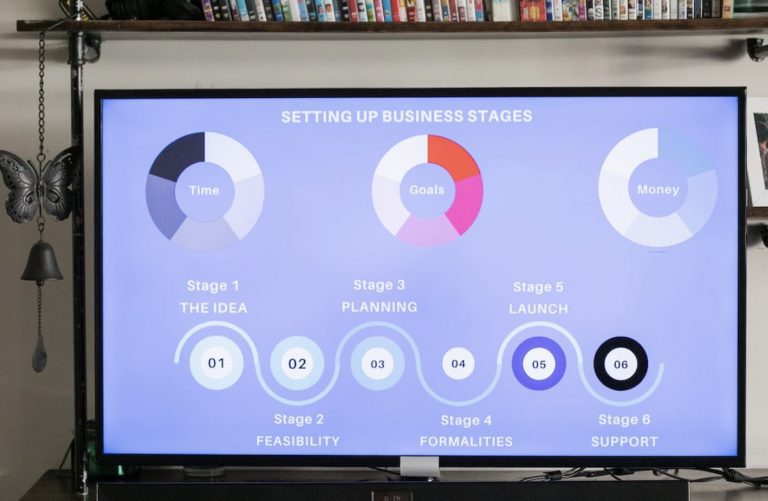


<p>If you are hearing and learning about infographics just now, you are missing out on the best marketing tool for your business. Infographics are not a new concept. It has been around since 2012 and has dramatically helped companies to improve their marketing strategies.</p>
<!-- WP QUADS Content Ad Plugin v. 3.0.1 -->
<div class="quads-location quads-ad135805 " id="quads-ad135805" style="float:none;text-align:center;padding:0px 0 0px 0;" data-lazydelay="3000">

</div>

<p>Creating infographics is more complex than most people think. Several elements must be considered to make a great infographic stand out. This article will provide you with the six best practices for designing infographics.</p>
<h2>What makes an amazing Infographic design?</h2>
<p>Infographics are helpful tools for breaking down complex information or detailed data into simpler information. A compelling infographic allows infographic creators to convey ideas to their target audience more easily and conveniently.</p>
<p>Several infographic designs can be created using different styles and layouts. Visual content commonly used in infographics are charts (bar or pie charts), icons, and illustrations.</p>
<!-- WP QUADS Content Ad Plugin v. 3.0.1 -->
<div class="quads-location quads-ad135804 " id="quads-ad135804" style="float:none;text-align:center;padding:0px 0 0px 0;" data-lazydelay="3000">

</div>

<h2>6 Best Practices to Create Infographics Stand Out</h2>
<p>Infographic creation can be successful if you apply the best practices recommended by experts. You don&#8217;t have to be an expert graphic artist or designer to create engaging infographics for digital marketing.</p>
<p>Try out the best practices for infographic design creation below to make visually appealing infographics.</p>
<ol>
<li aria-level="1">
<h3>Using Different Types of Data Visualization (Use Appropriate Visuals)</h3>
</li>
</ol>
<p>There are several data visualizations that you can use on your infographics. There are different ways of presenting data points and other visual elements to make them more attractive. Your data visualization choice will depend highly on the type of data point you want to show.</p>
<h4>Choose the Best Chart Type for Your Data</h4>
<p>You can choose from any chart types below to create your first infographic.</p>
<!-- WP QUADS Content Ad Plugin v. 3.0.1 -->
<div class="quads-location quads-ad135804 " id="quads-ad135804" style="float:none;text-align:center;padding:0px 0 0px 0;" data-lazydelay="3000">

</div>

<ul>
<li aria-level="1">Bar chart</li>
</ul>
<p>Bar charts are best used when you have to compare values. This type of visualization can help viewers easily understand the proportion between data values.</p>
<ul>
<li aria-level="1">Timelines</li>
</ul>
<p>Timelines help show visuals with a time progression context. This chart type is best for visualizing time. This is used for financial and strategic reports.</p>
<ul>
<li aria-level="1">Map</li>
</ul>
<p>A map shows location-based information (geographical data). It can also present demographic data and geographical statistics.</p>
<ul>
<li aria-level="1">Photos</li>
</ul>
<p>Photos are beneficial when presenting information that changes over time or information giving instructions that can best be presented using images.</p>
<!-- WP QUADS Content Ad Plugin v. 3.0.1 -->
<div class="quads-location quads-ad135804 " id="quads-ad135804" style="float:none;text-align:center;padding:0px 0 0px 0;" data-lazydelay="3000">

</div>

<ul>
<li aria-level="1">Pie chart</li>
</ul>
<p>A pie chart is helpful when you want to show portions of a whole at a specific time.</p>
<ul>
<li aria-level="1">Venn diagrams</li>
</ul>
<p>A Venn diagram is used to represent the logical relationship that exists between values. It shows both similar and dissimilar characteristics of the values being compared.</p>
<ol>
<li aria-level="1">
<h3>Using Templates</h3>
</li>
</ol>
<p>The best thing about making an infographic is that you don&#8217;t have to do everything from scratch. You can use an infographic template to save you time and effort. You can choose from several professionally made infographic templates from <a href="https://simpleslides.co">Simpleslides.co</a> to create interactive infographics.</p>
<p>Looking through various templates gives you an idea of how best to organize the data elements in your infographic. With a ready template, you can make little changes to make the template suitable for your infographic, such as changing the content details, images, or colors.</p>
<!-- WP QUADS Content Ad Plugin v. 3.0.1 -->
<div class="quads-location quads-ad135804 " id="quads-ad135804" style="float:none;text-align:center;padding:0px 0 0px 0;" data-lazydelay="3000">

</div>

<ol>
<li aria-level="1">
<h3>Considering the Target Audience</h3>
</li>
</ol>
<p>Considering your target audience when designing your infographic is a best practice you must remember. Your infographics&#8217; design elements, visuals, and content (vocabulary and language) change depending on your audience &#8211; young children, college students, or adults.</p>
<p>Younger children can appreciate an entire infographic with less text and several images. In comparison, adult audiences prefer reading more information and seeing some images.</p>
<ol>
<li aria-level="1">
<h3>Make a Catchy Title and a Good Headline</h3>
</li>
</ol>
<p>In making a title for your own infographic, remember the three Cs: clear, concise, and crisp. Your title should be catchy and descriptive at the same time.</p>
<p>It should be intriguing, yet the readers know what it is about. Keep a catchy title short; including a number value in your title can make it compelling and specific.</p>
<!-- WP QUADS Content Ad Plugin v. 3.0.1 -->
<div class="quads-location quads-ad135804 " id="quads-ad135804" style="float:none;text-align:center;padding:0px 0 0px 0;" data-lazydelay="3000">

</div>

<p>When your title is ready, you can begin writing a short headline for your infographic. The headline&#8217;s purpose is to give the readers an idea of what the entire infographic will be about.</p>
<p>The headline should be at most 70 characters and easy to understand. It should also include keywords to be searchable and have SEO advantage. It would also help if you check how your competitors name their infographics to have an idea and to create better titles.</p>
<ol>
<li aria-level="1">
<h3>Verifying Statistical Data</h3>
</li>
</ol>
<p>Double-check and verify the contents for accuracy if you intend to post your infographic on your website or social media accounts. You would want to avoid posting an infographic that has notable mistakes. This will make you less credible to your potential clients.</p>
<p>Below are a few ways to help you check your data for accuracy:</p>
<!-- WP QUADS Content Ad Plugin v. 3.0.1 -->
<div class="quads-location quads-ad135804 " id="quads-ad135804" style="float:none;text-align:center;padding:0px 0 0px 0;" data-lazydelay="3000">

</div>

<ul>
<li aria-level="1">Get data from reliable and <a href="https://libguides.usc.edu.au/credible">reputable sources</a>. Make sure to check the credibility of the author.</li>
<li aria-level="1">Statistical and financial data are very dynamic. They can become irrelevant in a few months. Always check when the data was gathered. Only use data that is three years old.</li>
</ul>
<p> ;</p>
<ol>
<li aria-level="1">
<h3>Using Best Design Practices</h3>
</li>
</ol>
<p>When it boils down to infographic design, you need a basic understanding of graphic design to create a good infographic. Below are some basic design principles you can incorporate into your infographics.</p>
<ul>
<li aria-level="1">Keep a logical structure for the information you want to share.</li>
<li aria-level="1">Use one to two fonts and colors for your entire infographic design. Be consistent in using these fonts and colors for uniformity.</li>
<li aria-level="1">Use negative space or white space to make your infographic readable and breathable.</li>
<li aria-level="1">Choose images or visual content appropriate for your infographic&#8217;s subject.</li>
<li aria-level="1">Your goal is to create a design that will make your readers interested in the content of your infographic. They should not be distracted by the animations, graphs, and colorful icons.</li>
</ul>
<h4>Use Grid Layout</h4>
<p>Using the grid to lay out your text and visual content makes organizing and prioritizing key information easier. It helps keep important elements in alignment. Using the grid system enables you to create enough space between elements in your infographic which can minimize visual tension.</p>
<h4>Applying Contrast</h4>
<p>You can create eye-catching infographics if you apply contrast. Contrast allows you to position side by side different elements to make each one stand out. For instance, you can make contrasting color combinations by pairing complementary colors.</p>
<p>Contrast your font sizes with a bigger font size for your title or main header, and use a relatively smaller font size for the subheadings. You can play around with images to have contrasting visuals. You can use a tinted or light image background underneath your chart or graph.</p>
<!-- WP QUADS Content Ad Plugin v. 3.0.1 -->
<div class="quads-location quads-ad135804 " id="quads-ad135804" style="float:none;text-align:center;padding:0px 0 0px 0;" data-lazydelay="3000">

</div>

<h4>Consistency in Design Layout</h4>
<p>Your infographic design should have a consistent flow from top to bottom. Consistency means using the same styles for images, fonts, colors, and text on your infographic. This will make it readable and look less cluttered.</p>
<h2>Final Thoughts</h2>
<p>In creating infographics, design is crucial. However, don&#8217;t focus too much on the design that you end up with bad content. The content or the message you want your readers to understand should be of primary importance.</p>
<p>The infographic design should reinforce or support your content to attract readers. The design should not be the spotlight; instead, it should highlight your infographic content. You can make your entire infographic stand out by following the best design practices above.</p>

<div class="essb_links essb_counter_modern_right essb_displayed_bottom essb_share essb_template_default4-retina essb_1565522415 print-no" id="essb_displayed_bottom_1565522415" data-essb-postid="142778" data-essb-position="bottom" data-essb-button-style="button" data-essb-template="default4-retina" data-essb-counter-pos="right" data-essb-url="https://www.explosion.com/142778/creating-infographics-that-stand-out-best-practices-for-design-and-layout/" data-essb-fullurl="https://www.explosion.com/142778/creating-infographics-that-stand-out-best-practices-for-design-and-layout/" data-essb-instance="1565522415"><ul class="essb_links_list"><li class="essb_item essb_link_facebook nolightbox essb_link_svg_icon"> <a href="https://www.facebook.com/sharer/sharer.php?u=https%3A%2F%2Fwww.explosion.com%2F142778%2Fcreating-infographics-that-stand-out-best-practices-for-design-and-layout%2F&t=Creating+Infographics+That+Stand+Out%3A+Best+Practices+for+Design+and+Layout" title="Share on Share" onclick="essb.window(&#39;https://www.facebook.com/sharer/sharer.php?u=https%3A%2F%2Fwww.explosion.com%2F142778%2Fcreating-infographics-that-stand-out-best-practices-for-design-and-layout%2F&t=Creating+Infographics+That+Stand+Out%3A+Best+Practices+for+Design+and+Layout&#39;,&#39;facebook&#39;,&#39;1565522415&#39;); return false;" target="_blank" rel="nofollow" class="nolightbox essb-s-bg-facebook essb-s-c-light essb-s-ch-light essb-s-bgh-dark essb-s-bg-network" ><span class="essb_icon essb_icon_facebook"><svg class="essb-svg-icon essb-svg-icon-facebook" aria-hidden="true" role="img" focusable="false" xmlns="http://www.w3.org/2000/svg" width="16" height="16" viewBox="0 0 16 16"><path d="M16 8.049c0-4.446-3.582-8.05-8-8.05C3.58 0-.002 3.603-.002 8.05c0 4.017 2.926 7.347 6.75 7.951v-5.625h-2.03V8.05H6.75V6.275c0-2.017 1.195-3.131 3.022-3.131.876 0 1.791.157 1.791.157v1.98h-1.009c-.993 0-1.303.621-1.303 1.258v1.51h2.218l-.354 2.326H9.25V16c3.824-.604 6.75-3.934 6.75-7.951"></path></svg></span><span class="essb_network_name">Share</span></a></li><li class="essb_item essb_link_twitter nolightbox essb_link_twitter_x essb_link_svg_icon"> <a href="https://x.com/intent/post?text=Creating%20Infographics%20That%20Stand%20Out%3A%20Best%20Practices%20for%20Design%20and%20Layout&;url=https%3A%2F%2Fwww.explosion.com%2F142778%2Fcreating-infographics-that-stand-out-best-practices-for-design-and-layout%2F" title="Share on Tweet" onclick="essb.window(&#39;https://x.com/intent/post?text=Creating%20Infographics%20That%20Stand%20Out%3A%20Best%20Practices%20for%20Design%20and%20Layout&;url=https%3A%2F%2Fwww.explosion.com%2F142778%2Fcreating-infographics-that-stand-out-best-practices-for-design-and-layout%2F&#39;,&#39;twitter&#39;,&#39;1565522415&#39;); return false;" target="_blank" rel="nofollow" class="nolightbox essb-s-bg-twitter essb-s-c-light essb-s-ch-light essb-s-bgh-dark essb-s-bg-network" ><span class="essb_icon essb_icon_twitter_x"><svg class="essb-svg-icon essb-svg-icon-twitter_x" aria-hidden="true" role="img" focusable="false" viewBox="0 0 24 24"><path d="M18.244 2.25h3.308l-7.227 8.26 8.502 11.24H16.17l-5.214-6.817L4.99 21.75H1.68l7.73-8.835L1.254 2.25H8.08l4.713 6.231zm-1.161 17.52h1.833L7.084 4.126H5.117z"></path></svg></span><span class="essb_network_name">Tweet</span></a></li><li class="essb_item essb_link_pinterest nolightbox essb_link_svg_icon"> <a href="#" title="Share on Pin It" onclick="essb.pinterest_picker(&#39;1565522415&#39;); return false;" target="_blank" rel="nofollow" class="nolightbox essb-s-bg-pinterest essb-s-c-light essb-s-ch-light essb-s-bgh-dark essb-s-bg-network" ><span class="essb_icon essb_icon_pinterest"><svg class="essb-svg-icon essb-svg-icon-pinterest" aria-hidden="true" role="img" focusable="false" width="32" height="32" viewBox="0 0 32 32" xmlns="http://www.w3.org/2000/svg"><path d="M10.625 12.25c0-1.375 0.313-2.5 1.063-3.438 0.688-0.938 1.563-1.438 2.563-1.438 0.813 0 1.438 0.25 1.875 0.813s0.688 1.25 0.688 2.063c0 0.5-0.125 1.125-0.313 1.813-0.188 0.75-0.375 1.625-0.688 2.563-0.313 1-0.563 1.75-0.688 2.313-0.25 1-0.063 1.875 0.563 2.625 0.625 0.688 1.438 1.063 2.438 1.063 1.75 0 3.188-1 4.313-2.938 1.125-2 1.688-4.375 1.688-7.188 0-2.125-0.688-3.875-2.063-5.25-1.375-1.313-3.313-2-5.813-2-2.813 0-5.063 0.875-6.75 2.688-1.75 1.75-2.625 3.875-2.625 6.375 0 1.5 0.438 2.75 1.25 3.75 0.313 0.313 0.375 0.688 0.313 1.063-0.125 0.313-0.25 0.813-0.375 1.5-0.063 0.25-0.188 0.438-0.375 0.5s-0.375 0.063-0.563 0c-1.313-0.563-2.25-1.438-2.938-2.75s-1-2.813-1-4.5c0-1.125 0.188-2.188 0.563-3.313s0.875-2.188 1.625-3.188c0.75-1.063 1.688-1.938 2.688-2.75 1.063-0.813 2.313-1.438 3.875-1.938 1.5-0.438 3.125-0.688 4.813-0.688 1.813 0 3.438 0.313 4.938 0.938 1.5 0.563 2.813 1.375 3.813 2.375 1.063 1.063 1.813 2.188 2.438 3.5 0.563 1.313 0.875 2.688 0.875 4.063 0 3.75-0.938 6.875-2.875 9.313-1.938 2.5-4.375 3.688-7.375 3.688-1 0-1.938-0.188-2.813-0.688-0.875-0.438-1.5-1-1.875-1.688-0.688 2.938-1.125 4.688-1.313 5.25-0.375 1.438-1.25 3.188-2.688 5.25h-1.313c-0.25-2.563-0.188-4.688 0.188-6.375l2.438-10.313c-0.375-0.813-0.563-1.813-0.563-3.063z"></path></svg></span><span class="essb_network_name">Pin It</span></a></li><li class="essb_item essb_link_mail nolightbox essb_link_svg_icon"> <a href="#" title="Share on Email" onclick="essb_open_mailform(&#39;1565522415&#39;); return false;" target="_blank" rel="nofollow" class="nolightbox essb-s-bg-mail essb-s-c-light essb-s-ch-light essb-s-bgh-dark essb-s-bg-network" ><span class="essb_icon essb_icon_mail"><svg class="essb-svg-icon essb-svg-icon-mail" aria-hidden="true" role="img" focusable="false" width="32" height="32" xmlns="http://www.w3.org/2000/svg" viewBox="0 0 60 60"><polygon points="60,50.234 60,9.944 39.482,30.536 " /><polygon points="0,9.941 0,50.234 20.519,30.535 " /><path d="M1.387,8.5l21.002,21.08c0.121,0.051,0.471,0.415,0.517,0.519l5.941,5.963c0.635,0.591,1.672,0.59,2.333-0.025l5.911-5.933c0.046-0.105,0.4-0.473,0.522-0.524L58.615,8.5H1.387z" /><path d="M38.07,31.954l-5.5,5.52c-0.73,0.68-1.657,1.019-2.58,1.019c-0.914,0-1.823-0.332-2.533-0.993l-5.526-5.546L1.569,51.5h56.862L38.07,31.954z" /></svg></span><span class="essb_network_name">Email</span></a></li></ul></div>



0 Comments