





<p class="p1">For several purposes, we need to record our PC screen &#8211; making tutorials or recording gameplay is the most common thing. So, a <b>screen recorder</b> is a handy tool for professionals and hobbyist users. But there are a plethora of tools available for recording screen on Windows 10. An unbiased review can assist you in selecting the right one. Therefore, we came up with this iFun Screen Recorder review that will help you know all about this <a href="https://recorder.iobit.com/en/online-screen-recorder?utm_source=media&;utm_campaign=explosion.com"><span class="s1"><b>online screen recorder</b></span></a>.</p>
<!-- WP QUADS Content Ad Plugin v. 3.0.1 -->
<div class="quads-location quads-ad135805 " id="quads-ad135805" style="float:none;text-align:center;padding:0px 0 0px 0;" data-lazydelay="3000">

</div>

<p class="p1"><b>Introducing iFun Screen Recorder</b></p>
<p class="p1">iFun Screen Recorder is a completely free and simple yet powerful screen recorder with a light built-in video editor. It makes screen recording, screen capture, and video editing easy and straightforward. This <a href="https://recorder.iobit.com/?utm_source=media&;utm_campaign=explosion.com"><span class="s1"><b>screen recorder</b></span></a><b> </b>is available for Microsoft Windows 10/8.1/8/7.<span class="Apple-converted-space"> </span></p>
<p class="p1">Key Features &; Highlights</p>
<!-- WP QUADS Content Ad Plugin v. 3.0.1 -->
<div class="quads-location quads-ad135804 " id="quads-ad135804" style="float:none;text-align:center;padding:0px 0 0px 0;" data-lazydelay="3000">

</div>

<ul class="ul1">
<li class="li3"><span class="s2">Record any selected region on your computer in the high-quality video quickly</span></li>
<li class="li3"><span class="s2"> Add webcam overlay to video Support full-screen HD game recording</span></li>
<li class="li3"><span class="s2">There is no time limit for recording and no watermark.</span></li>
<li class="li3"><span class="s2">Provide an easy-to-use screenshot feature.</span></li>
<li class="li3"><span class="s2">A simple video editor for editing captured screens.<span class="Apple-converted-space"> </span></span></li>
<li class="li3"><span class="s2">Quick share to YouTube, Facebook, Instagram, Twitch, and other platforms.</span></li>
</ul>
<p class="p3"><b>How To Record Screen On Windows 10</b><span class="s3"><b> using </b></span><span class="s2"><b>iFun Screen Recorder?</b></span></p>
<p class="p1">You must first install iFun Screen Recorder on your Windows PC. It is free to download and use. It gives you free access to all of its features, allowing you to create the professional video you want.</p>
<p class="p1">Here&#8217;s a short tutorial on <a href="https://recorder.iobit.com/en/blog/how-to-record-your-screen-windows-10-1?utm_source=media&;utm_campaign=explosion.com"><span class="s1"><b>how to record screen on Windows 10</b></span></a> using iFun Screen Recorder:</p>
<p class="p1"><b>Step 1. Select the region</b></p>
<!-- WP QUADS Content Ad Plugin v. 3.0.1 -->
<div class="quads-location quads-ad135804 " id="quads-ad135804" style="float:none;text-align:center;padding:0px 0 0px 0;" data-lazydelay="3000">

</div>

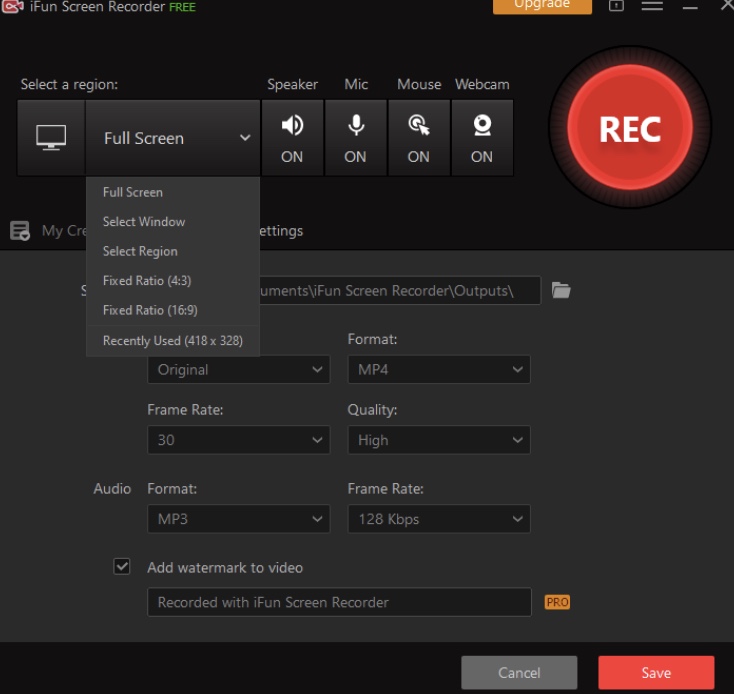
<p><img class="alignnone size-full wp-image-139108" src="https://www.explosion.com/wp-content/uploads/2021/04/Screenshot-2021-04-14-at-12.18.38.jpg" alt="" width="734" height="694" /></p>
<p class="p1">Press the drop-down arrow near the full screen to record the entire screen or pick a region or window to record. It also allows you to record using a fixed ratio or the most recently used recording size.</p>
<p class="p1"><b>Step 2. Set the settings for audio, mouse, and webcam</b></p>
<p class="p1">By clicking the On/ Off button for each function in the middle of the main screen, you can easily set whether also to record the Speaker, Microphone, Mouse, and Webcam to your video. If you see N/A next to any settings, it means you don&#8217;t have the associated device enabled or linked to your screen.</p>
<!-- WP QUADS Content Ad Plugin v. 3.0.1 -->
<div class="quads-location quads-ad135804 " id="quads-ad135804" style="float:none;text-align:center;padding:0px 0 0px 0;" data-lazydelay="3000">

</div>

<p class="p1"><b>Step 3. Click REC to Start the Recording</b></p>
<p class="p1">When you press the red REC button, it will begin recording after a 3-second countdown.</p>
<p class="p1"><b>Step 4. Click the Done button or press F9 (by default) to complete the recording</b></p>
<p class="p1">When you&#8217;re finished recording, you can either click the red Done button in the floating toolbar, as previously stated, or press the default hotkey F9.</p>
<!-- WP QUADS Content Ad Plugin v. 3.0.1 -->
<div class="quads-location quads-ad135804 " id="quads-ad135804" style="float:none;text-align:center;padding:0px 0 0px 0;" data-lazydelay="3000">

</div>

<p class="p1"><b>Step 5. Video Editing and Sharing</b></p>
<p class="p1">After you&#8217;ve finished filming, you can find the recordings in the Videos section of My Creations. When you right-click the recording, you&#8217;ll see options like Preview, Edit, Upload, Delete, and Open File Location. When you press Edit, you will be taken to the editing screen shown below. You can then edit your recording as you want and then click on the “Save as” button to save your recordings.<span class="Apple-converted-space"> </span><b><span class="Apple-converted-space"> </span></b></p>
<p class="p1"><b>Verdict: Should I Use iFun Screen Recorder?</b></p>
<p class="p1">If you want to record your PC screen or games with audio, we highly suggest iFun Screen Recorder. It&#8217;s simple to use that comes with an in-built video editor and has hundreds of export options.</p>
<!-- WP QUADS Content Ad Plugin v. 3.0.1 -->
<div class="quads-location quads-ad135804 " id="quads-ad135804" style="float:none;text-align:center;padding:0px 0 0px 0;" data-lazydelay="3000">

</div>

</p>
<div class="essb_links essb_counter_modern_right essb_displayed_bottom essb_share essb_template_default4-retina essb_162905695 print-no" id="essb_displayed_bottom_162905695" data-essb-postid="139107" data-essb-position="bottom" data-essb-button-style="button" data-essb-template="default4-retina" data-essb-counter-pos="right" data-essb-url="https://www.explosion.com/139107/ifun-screen-recorder-review-2021/" data-essb-fullurl="https://www.explosion.com/139107/ifun-screen-recorder-review-2021/" data-essb-instance="162905695"><ul class="essb_links_list"><li class="essb_item essb_link_facebook nolightbox essb_link_svg_icon"> <a href="https://www.facebook.com/sharer/sharer.php?u=https%3A%2F%2Fwww.explosion.com%2F139107%2Fifun-screen-recorder-review-2021%2F&t=iFun+Screen+Recorder+Review" title="Share on Share" onclick="essb.window(&#39;https://www.facebook.com/sharer/sharer.php?u=https%3A%2F%2Fwww.explosion.com%2F139107%2Fifun-screen-recorder-review-2021%2F&t=iFun+Screen+Recorder+Review&#39;,&#39;facebook&#39;,&#39;162905695&#39;); return false;" target="_blank" rel="nofollow" class="nolightbox essb-s-bg-facebook essb-s-c-light essb-s-ch-light essb-s-bgh-dark essb-s-bg-network" ><span class="essb_icon essb_icon_facebook"><svg class="essb-svg-icon essb-svg-icon-facebook" aria-hidden="true" role="img" focusable="false" xmlns="http://www.w3.org/2000/svg" width="16" height="16" viewBox="0 0 16 16"><path d="M16 8.049c0-4.446-3.582-8.05-8-8.05C3.58 0-.002 3.603-.002 8.05c0 4.017 2.926 7.347 6.75 7.951v-5.625h-2.03V8.05H6.75V6.275c0-2.017 1.195-3.131 3.022-3.131.876 0 1.791.157 1.791.157v1.98h-1.009c-.993 0-1.303.621-1.303 1.258v1.51h2.218l-.354 2.326H9.25V16c3.824-.604 6.75-3.934 6.75-7.951"></path></svg></span><span class="essb_network_name">Share</span></a></li><li class="essb_item essb_link_twitter nolightbox essb_link_twitter_x essb_link_svg_icon"> <a href="https://x.com/intent/post?text=iFun%20Screen%20Recorder%20Review&;url=https%3A%2F%2Fwww.explosion.com%2F139107%2Fifun-screen-recorder-review-2021%2F" title="Share on Tweet" onclick="essb.window(&#39;https://x.com/intent/post?text=iFun%20Screen%20Recorder%20Review&;url=https%3A%2F%2Fwww.explosion.com%2F139107%2Fifun-screen-recorder-review-2021%2F&#39;,&#39;twitter&#39;,&#39;162905695&#39;); return false;" target="_blank" rel="nofollow" class="nolightbox essb-s-bg-twitter essb-s-c-light essb-s-ch-light essb-s-bgh-dark essb-s-bg-network" ><span class="essb_icon essb_icon_twitter_x"><svg class="essb-svg-icon essb-svg-icon-twitter_x" aria-hidden="true" role="img" focusable="false" viewBox="0 0 24 24"><path d="M18.244 2.25h3.308l-7.227 8.26 8.502 11.24H16.17l-5.214-6.817L4.99 21.75H1.68l7.73-8.835L1.254 2.25H8.08l4.713 6.231zm-1.161 17.52h1.833L7.084 4.126H5.117z"></path></svg></span><span class="essb_network_name">Tweet</span></a></li><li class="essb_item essb_link_pinterest nolightbox essb_link_svg_icon"> <a href="#" title="Share on Pin It" onclick="essb.pinterest_picker(&#39;162905695&#39;); return false;" target="_blank" rel="nofollow" class="nolightbox essb-s-bg-pinterest essb-s-c-light essb-s-ch-light essb-s-bgh-dark essb-s-bg-network" ><span class="essb_icon essb_icon_pinterest"><svg class="essb-svg-icon essb-svg-icon-pinterest" aria-hidden="true" role="img" focusable="false" width="32" height="32" viewBox="0 0 32 32" xmlns="http://www.w3.org/2000/svg"><path d="M10.625 12.25c0-1.375 0.313-2.5 1.063-3.438 0.688-0.938 1.563-1.438 2.563-1.438 0.813 0 1.438 0.25 1.875 0.813s0.688 1.25 0.688 2.063c0 0.5-0.125 1.125-0.313 1.813-0.188 0.75-0.375 1.625-0.688 2.563-0.313 1-0.563 1.75-0.688 2.313-0.25 1-0.063 1.875 0.563 2.625 0.625 0.688 1.438 1.063 2.438 1.063 1.75 0 3.188-1 4.313-2.938 1.125-2 1.688-4.375 1.688-7.188 0-2.125-0.688-3.875-2.063-5.25-1.375-1.313-3.313-2-5.813-2-2.813 0-5.063 0.875-6.75 2.688-1.75 1.75-2.625 3.875-2.625 6.375 0 1.5 0.438 2.75 1.25 3.75 0.313 0.313 0.375 0.688 0.313 1.063-0.125 0.313-0.25 0.813-0.375 1.5-0.063 0.25-0.188 0.438-0.375 0.5s-0.375 0.063-0.563 0c-1.313-0.563-2.25-1.438-2.938-2.75s-1-2.813-1-4.5c0-1.125 0.188-2.188 0.563-3.313s0.875-2.188 1.625-3.188c0.75-1.063 1.688-1.938 2.688-2.75 1.063-0.813 2.313-1.438 3.875-1.938 1.5-0.438 3.125-0.688 4.813-0.688 1.813 0 3.438 0.313 4.938 0.938 1.5 0.563 2.813 1.375 3.813 2.375 1.063 1.063 1.813 2.188 2.438 3.5 0.563 1.313 0.875 2.688 0.875 4.063 0 3.75-0.938 6.875-2.875 9.313-1.938 2.5-4.375 3.688-7.375 3.688-1 0-1.938-0.188-2.813-0.688-0.875-0.438-1.5-1-1.875-1.688-0.688 2.938-1.125 4.688-1.313 5.25-0.375 1.438-1.25 3.188-2.688 5.25h-1.313c-0.25-2.563-0.188-4.688 0.188-6.375l2.438-10.313c-0.375-0.813-0.563-1.813-0.563-3.063z"></path></svg></span><span class="essb_network_name">Pin It</span></a></li><li class="essb_item essb_link_mail nolightbox essb_link_svg_icon"> <a href="#" title="Share on Email" onclick="essb_open_mailform(&#39;162905695&#39;); return false;" target="_blank" rel="nofollow" class="nolightbox essb-s-bg-mail essb-s-c-light essb-s-ch-light essb-s-bgh-dark essb-s-bg-network" ><span class="essb_icon essb_icon_mail"><svg class="essb-svg-icon essb-svg-icon-mail" aria-hidden="true" role="img" focusable="false" width="32" height="32" xmlns="http://www.w3.org/2000/svg" viewBox="0 0 60 60"><polygon points="60,50.234 60,9.944 39.482,30.536 " /><polygon points="0,9.941 0,50.234 20.519,30.535 " /><path d="M1.387,8.5l21.002,21.08c0.121,0.051,0.471,0.415,0.517,0.519l5.941,5.963c0.635,0.591,1.672,0.59,2.333-0.025l5.911-5.933c0.046-0.105,0.4-0.473,0.522-0.524L58.615,8.5H1.387z" /><path d="M38.07,31.954l-5.5,5.52c-0.73,0.68-1.657,1.019-2.58,1.019c-0.914,0-1.823-0.332-2.533-0.993l-5.526-5.546L1.569,51.5h56.862L38.07,31.954z" /></svg></span><span class="essb_network_name">Email</span></a></li></ul></div>



0 Comments